You narrow the shortlist to tl;dv, Fireflies, and Fathom, open a comparison article, and realize the company that wrote it is one of the three. "Fireflies vs. Fathom" is written by Fireflies. "The best Fathom alternatives" is written by tl;dv. The facts in them are usually accurate. The conclusions point at whoever published them.
The three at a glance
| tl;dv | Fireflies.ai | Fathom | |
|---|---|---|---|
| Free plan | Yes | Yes | Yes |
| Cheapest paid (annual) | €18/seat/mo | $10/seat/mo | $15/user/mo (Team) |
| Currency | Shown in local currency | USD | USD |
| Unlimited on free | Recordings, transcription | Transcription, AI summaries | Recordings, transcription |
| Free-tier cap | 10 AI meeting notes/month | 400 minutes storage per team | No cap stated on the pricing page |
| Languages | 30+ (from Free) | 100+ claimed | 38 for transcripts |
| Bot-free mode | Yes (audio only) | Yes (no audio or video file kept) | Yes (video / audio+transcript / transcript-only) |
The one-line version:
- Want to stay on free the longest → Fathom (unlimited recordings and transcriptions)
- Want the meeting video kept, priced in your own currency → tl;dv
- Want the work after the meeting automated too (email, Slack, CRM) → Fireflies.ai
First, what changed in 2026
Before the tools themselves, the ground they sit on shifted.
Google Meet split join requests into two queues
Teams changed how it treats external bots
Microsoft put this on the Microsoft 365 roadmap in March 2026 and began rolling it out by the end of June. It arrives as an admin policy called "Manage external bots and their access to meetings," described like this:
Teams automatically detects potential bots, places them in the meeting lobby, clearly identifies them, and prompts organizers to confirm admission.
It covers Windows, macOS, Android, and iOS, and admins can assign the policy per user or group. Allow lists, a full block on external bots, and audit logs are slated to follow.
This is not a story about any one tool misbehaving. It is the meeting platforms deciding how bots in general should be handled.
Which is why all three built bot-free modes
tl;dv
Pricing displays in your local currency
tl;dv's pricing page renders in local currency: from Europe it shows euros, from Japan it shows yen.
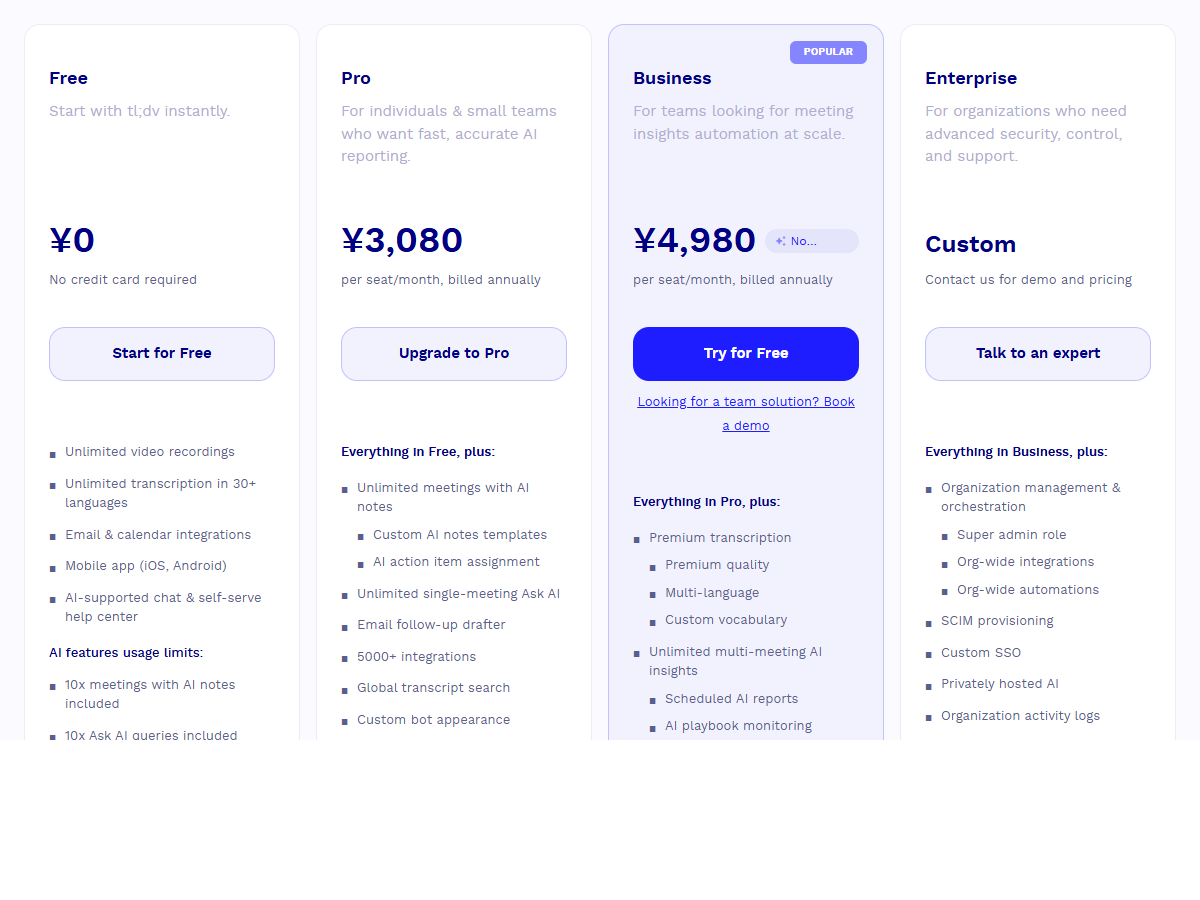
| Plan | Monthly (per seat) | Annual (per seat/month) |
|---|---|---|
| Free | €0 | €0 |
| Pro | €29 | €18 |
| Business | €39 | €29 |
| Enterprise | Contact sales | Contact sales |
On the free tier, the cap is on AI usage
Pro removes the AI notes limit and adds custom AI note templates, action item assignment, global transcript search, 5,000+ integrations, custom bot appearance, and unlimited uploads and storage. Business adds premium transcription, multi-language, and custom vocabulary.
The bot-free mode captures audio only
Where tl;dv fits
- You want the meeting video itself kept, unlimited, for free
- You want to be billed in your own currency
- Roughly 10 meetings a month need AI notes, so free covers you
Fireflies.ai
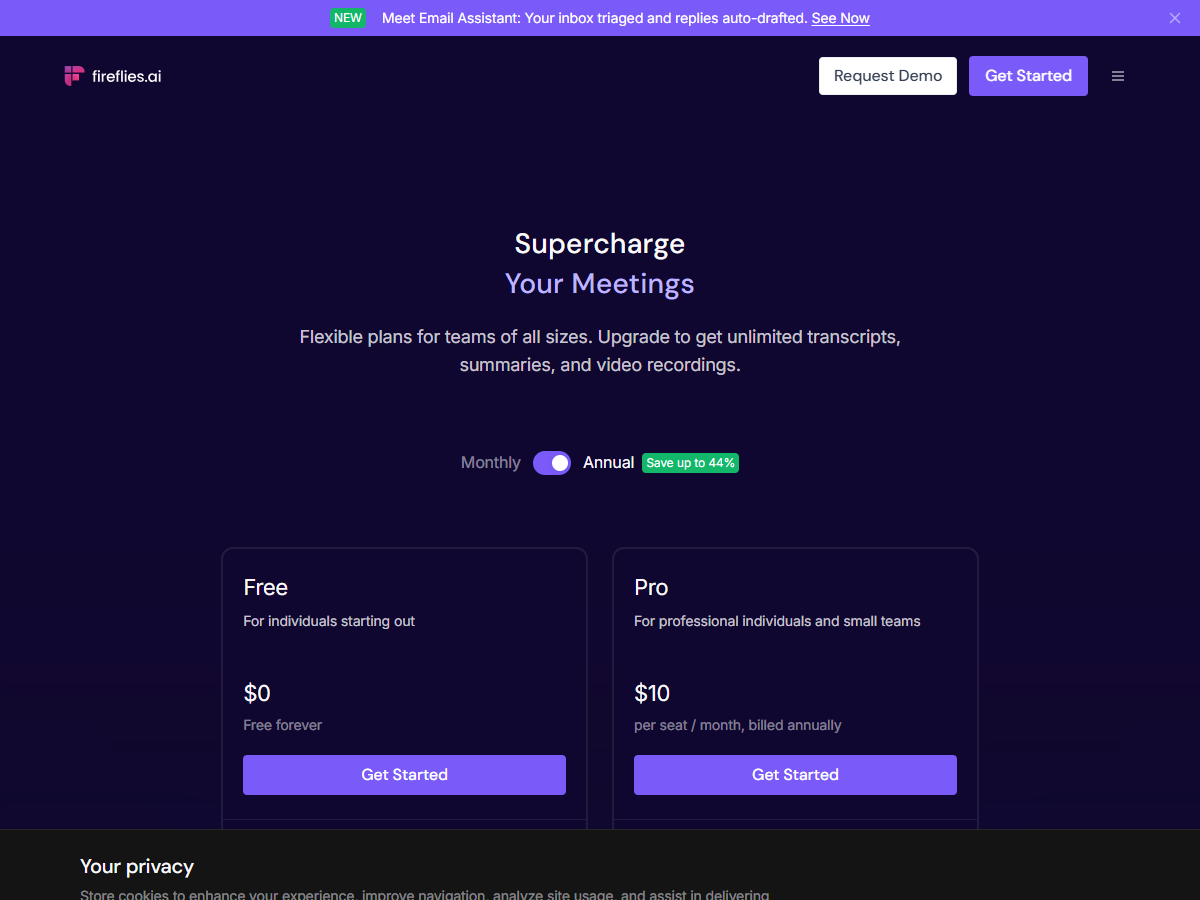
Pricing
| Plan | Monthly (per seat) | Annual (per seat/month) |
|---|---|---|
| Free | $0 | $0 |
| Pro | $18 | $10 |
| Business | $29 | $19 |
| Enterprise | $39 | $39 |
On the free tier, the cap is storage
The bot-free mode keeps no audio file
What it leaves behind is unusual:
Recording without a Fireflies.ai Notetaker (bot) does not save audio or video files. Fireflies captures system audio and generates a transcript and summary once the meeting ends.
If part of your workflow is going back to listen, check this first. If your organization would rather not retain audio at all, it is a feature rather than a limitation.
Where Fireflies fits
- You want meeting output flowing onward into email, Slack, and CRM
- You transcribe a high volume and text is what you need
- You have a policy reason to avoid keeping audio
Fathom
Pricing
| Plan | Monthly | Annual (per month) |
|---|---|---|
| Free (individual) | $0 | $0 |
| Premium (individual) | $20 | $16 |
| Team (2+ users) | $19/user | $15/user |
| Business (2+ users) | $34/user | $25/user |
| Enterprise | Contact sales | Contact sales |
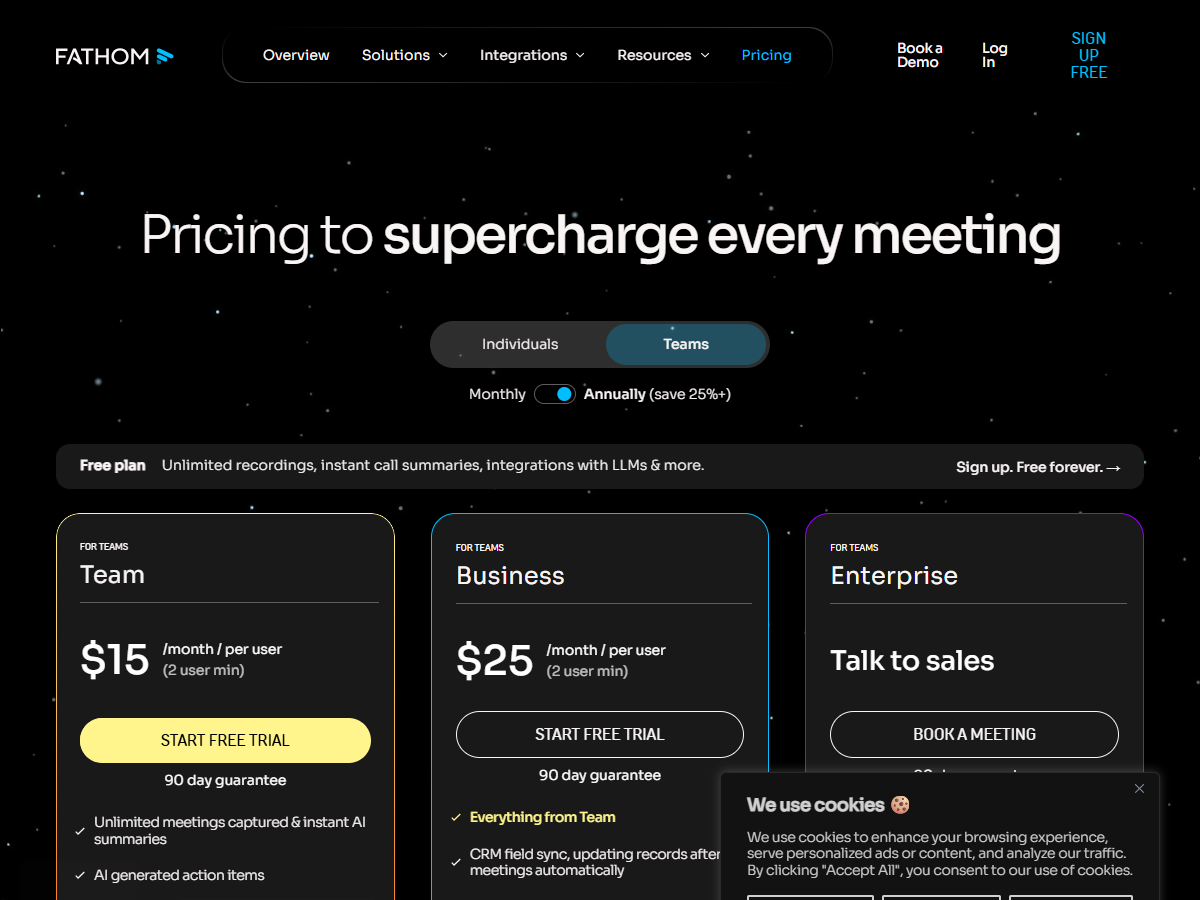
Paid plans carry a 90-day guarantee.
The free tier is the widest
Premium adds advanced summaries, AI-generated action items, a conversational meeting assistant, and a custom meeting bot.
38 languages for transcripts, six for summary translation
How the bot looks, and the bot-free modes
Fathom's release notes then describe capture without a bot: "Choose how Fathom captures your meetings, bot or no bot, video audio or transcript-only," listed as live on Mac. The modes are:
- Bot-free video (limited beta for Zoom)
- Bot-free audio + transcript
- Bot-free transcript only
Because no bot is needed, Fathom also notes it now works in Slack huddles.
Fathom is also explicit that dropping the bot does not make recording invisible:
There's no way to silently record — on both the previous version and the bot-free experience, there is always some form of visibility or consent mechanism in place.
Where Fathom fits
- You want unlimited recording and transcription without paying
- You want to decide bot or no bot per meeting
- You need coverage for places a bot can't go, like Slack huddles
The three, side by side
Pricing
| tl;dv | Fireflies.ai | Fathom | |
|---|---|---|---|
| Free | Yes | Yes | Yes |
| Individual paid (annual) | €18/seat/mo | $10/seat/mo (Pro) | $16/mo (Premium) |
| Team (annual) | €29/seat/mo (Business) | $19/seat/mo (Business) | $15 to $25/user/mo |
| Currency | Local currency | USD | USD |
What's unlimited on free, and what isn't
| Unlimited | Capped | |
|---|---|---|
| tl;dv | Recordings, transcription (30+ languages) | 10 AI meeting notes, 10 Ask AI queries per month |
| Fireflies.ai | Transcription, AI summaries | 400 minutes storage per team, 20 AI credits, video recording needs Pro |
| Fathom | Recordings, transcriptions | No cap stated on the pricing page |
What survives in bot-free mode
| Video | Audio file | Transcript and summary | |
|---|---|---|---|
| tl;dv | Not kept | Kept (system audio recording) | Kept |
| Fireflies.ai | Not kept | Not kept | Kept |
| Fathom | Possible via Zoom limited beta | Depends on mode | Kept |
Turn the bot off and the video goes with it
That follows from how it works. A bot receives the meeting stream because it is a participant. A tool that doesn't join listens to your computer's audio instead, so audio is where the record starts.
For plenty of meetings that's fine. Internal standups, one-on-ones, quick calls. Text is enough.
For others, the missing video costs you something later:
- Which moment in a product demo the prospect reacted to
- Which slide was on screen when the objection came up
- A shared spec document, or a diagram drawn on a whiteboard
- Recording is free, unlimited in length, and watermark-free, with no per-meeting cap
- No virtual audio setup to capture your mic and the other side together
- On Pro ($9/month at launch pricing, first two weeks free, no credit card required), AI generates meeting notes from the recording and sends them to your Notion database
- Speaker identification included
Choosing between them
No rankings. Pick by what you care about.
| What matters to you | Candidate |
|---|---|
| Staying on the free tier long-term | Fathom (unlimited recordings and transcriptions) |
| Being billed in your local currency | tl;dv |
| Automating the work after the meeting (email, Slack, CRM) | Fireflies.ai |
| Not retaining audio in your organization | Fireflies.ai (bot-free mode keeps no audio) |
| Switching bot on and off per meeting | Fathom |
| Making it visible that you're recording | Any of the three (the bot shows in the participant list) |
| Keeping the meeting video as part of the record | A screen-recording-first tool (such as Qureco) |
Used in bot mode, all three are independent of your own OS, since the bot joins from the cloud. Bot-free modes run through a desktop app, so check platform support: tl;dv lists Mac and Windows, and Fathom's release notes describe the bot-free capture as live on Mac.
Frequently asked questions
Can I try all three on the free tier?
Yes. All three have free plans you can start without a credit card. You can even put more than one in the same meeting, though the participant list fills up with bots, so an internal meeting is the practical place to test.
Do they work for meetings in languages other than English?
All three support a wide set of languages. tl;dv offers 30+ from the free tier, Fireflies advertises 100+, and Fathom lists 38 for transcripts. Coverage varies by feature though, as with Fathom's automatic summary translation being limited to six European languages. Check the specific feature you plan to use, and run one real meeting through the free tier, since accuracy depends on your subject matter and audio setup.
If I use bot-free mode, do I still need to tell people?
Yes. A bot not appearing in the participant list is a separate question from whether recording is appropriate, and the vendors don't treat it as one either. Fathom states plainly that there is no way to record silently, and its bot-free mode posts a message in the meeting chat when recording starts.
What do I do if the bot can't get into a Google Meet call?
The host can admit it. Requests land in the second queue where the default is to deny, so approving it restores the normal behavior. If doing that every time is the annoyance, switching to the vendor's bot-free mode or recording on your own machine both remove the step.
Wrapping up
- The platforms changed the rules in 2026. Google Meet splits join requests into two queues with deny as the default on one of them; Teams marks external bots "Unverified" and requires organizer approval
- All three now ship bot-free modes. Bot versus bot-free is no longer the axis you choose on
- The free tiers cap different things. tl;dv: unlimited recording but 10 AI notes a month. Fireflies: unlimited transcription but 400 minutes of team storage. Fathom: unlimited recordings and transcriptions
- Turning the bot off changes what's left. tl;dv keeps audio, Fireflies keeps neither audio nor video, Fathom can keep video through a Zoom limited beta
- Whether you need the video decides if the three are enough, or if you should start from a screen recorder instead
Run one of your own meetings through a free tier. The ceiling you hit first tells you which plan you actually need.

Qureco Screen Recorder
Powerful screen recording app for Mac
Record meetings, let AI handle the notes, just read what arrives in Notion.
Try all features free for the first two weeks.