You hit play on the recording—and only your own voice was there. The other person's voice was gone completely.
The Fastest Way: Record the Other Voice with Free "Qureco"
- Download it from the official site and launch it
- Turn on "System Audio" (this is what captures the other person's voice)
- Hit record
Your Mac's sound settings stay untouched, so you still hear the meeting as usual. Below, we'll cover why the mic can't capture it and what the other options are.
Qureco Screen Recorder
Powerful screen recording app for Mac
Record meetings, let AI handle the notes, just read what arrives in Notion.
Try all features free for the first month.
It's How macOS Works, Not Your Mistake
The Best Mac Screen Recording Tools That Capture Internal Audio
| App | Price | Internal audio | Watermark | Ease of setup | Notes |
|---|---|---|---|---|---|
| Qureco | Free | Yes (no setup) | None | ◎ Install & toggle on | Unlimited length. Just turn on System Audio to capture the other voice |
| OBS Studio | Free | Yes (complex setup) | None | △ Learning curve | Popular high-powered tool among streamers |
| Loom | Free+ (limited free tier) | Yes (needs a setting) | None | ◯ Easy | Free tier caps you at 25 videos / 5 min each, and downloads are paid |
| CleanShot X | Paid (from $29 one-time) | Yes | None | ◯ Easy | All-in-one screenshot, recording, and annotation tool for Mac |
| ScreenFlow | Paid ($169 one-time) | Yes | Trial exports watermarked | △ Full editing suite | Mac-only; recording plus video editing in one |
| Bandicam | Paid (limited free tier) | Yes | Free tier limited | ◯ Fairly easy | A long-standing, feature-rich recorder |
| EaseUS RecExperts | Paid (limited free tier) | Yes | Free tier limited | ◯ Fairly easy | An easy-to-use, multi-feature recorder |
Qureco (Free, No Setup)
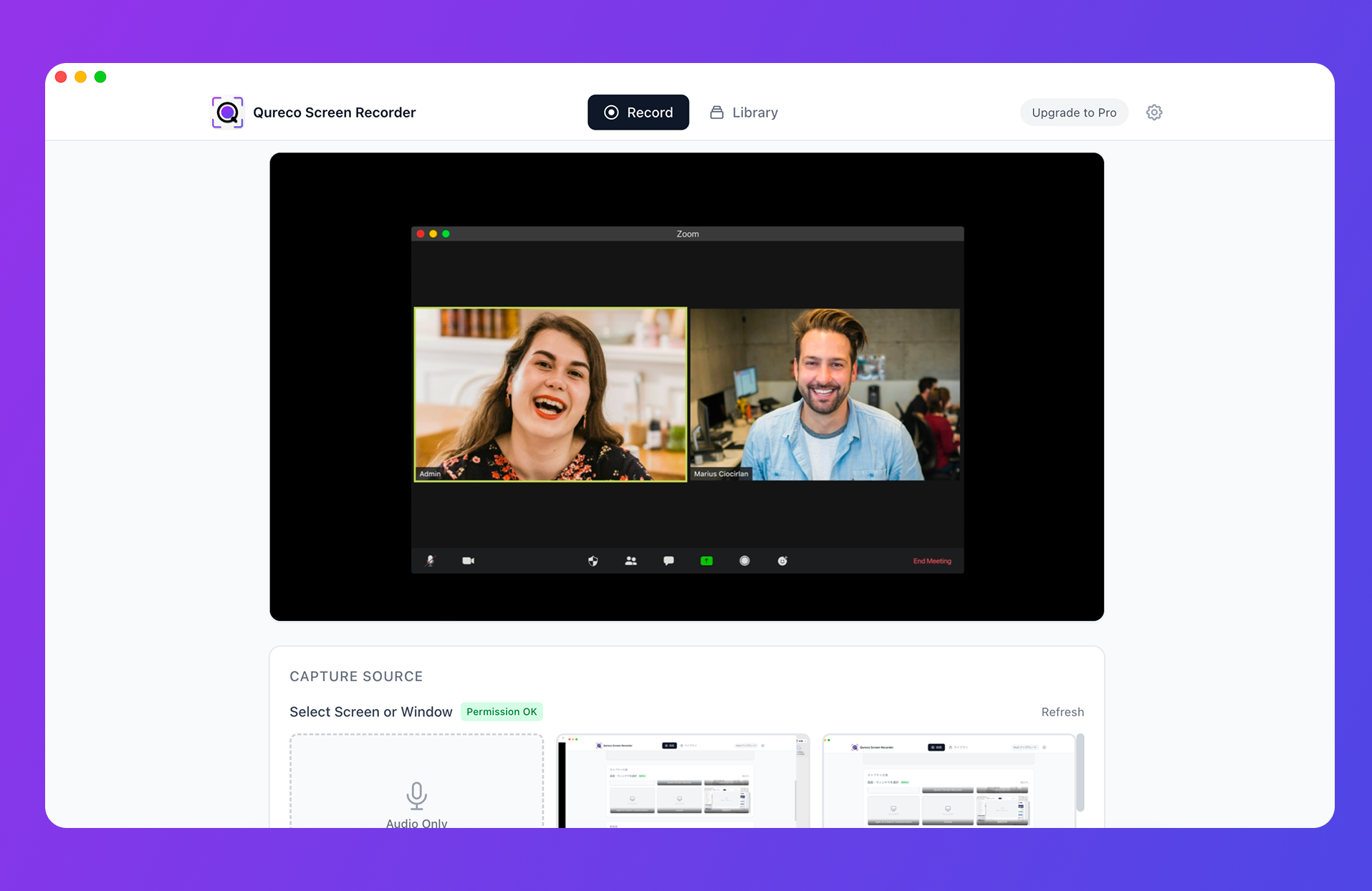
A free app that records internal audio without any virtual audio—just turn on System Audio (the other person's voice). Screen recording is unlimited with no watermark, and it doesn't change your Mac's sound settings. If you want the fastest fix for "can't record the other person's voice," this alone is enough.
OBS Studio (Free, High-Powered)
A free, open-source staple popular with streamers. On macOS 13+, it can capture system audio too. That said, the learning curve for scenes and sources is on the higher side—it's best for people who want to stream seriously, not just record.
Bandicam (Feature-Rich, Leans Paid)
A long-standing recorder with rich capture features. The Mac version records system audio + mic without BlackHole. The free tier limits recording time and adds a watermark, so full use means a paid plan.
EaseUS RecExperts (Feature-Rich, Leans Paid)
An easy-to-use, multi-feature recorder that supports internal audio. It also has free-tier limits, so serious use requires a paid plan.
Loom (Free Tier, Built for Sharing)
A popular tool that lets you share a recording instantly via a link. Turn on "Use system audio" in the desktop app and it captures internal audio too. There's no watermark, but the free plan caps you at 25 videos of 5 minutes each, and downloading the files requires a paid plan.
CleanShot X (One-Time Purchase, All-in-One)
A Mac tool that handles screenshots, recording, annotation, and sharing in one place. It can capture the sound playing on your Mac (internal audio). At $29+ one-time it's affordable and watermark-free, but it's a paid app, not free.
ScreenFlow (Mac-Only, Editing Included)
Mac-only software that combines recording with a full video editor. It captures system audio and suits tutorials and course videos. It's a $169 one-time purchase, and trial exports carry a watermark.
Why Qureco Is Still the Pick
- Completely free: Screen recording is unlimited with no watermark
- No setup: No virtual audio or Audio MIDI Setup—just turn on System Audio
- Doesn't touch your sound settings: It doesn't switch your audio output, so you still hear the meeting normally
- Toggle mic and the other voice separately: Record only the audio you need
OBS and Loom are free to use, but OBS takes setup to learn and Loom's free tier caps your recording count and length (with paid downloads). CleanShot X, ScreenFlow, Bandicam, and EaseUS all charge for full internal-audio use. Qureco is the one that checks all of "free, no setup, right now." Just download it for free and try recording the other person's voice on your next call.
If you later want to automate note-taking too, there's an option (Pro) to auto-generate AI meeting notes and sync them to Notion. But for simply capturing the other person's voice, the free version is all you need.
Summary: The Other Voice Can't Be Captured by the Mic—Switching Tools Is the Shortcut
Qureco Screen Recorder
Powerful screen recording app for Mac
Record meetings, let AI handle the notes, just read what arrives in Notion.
Try all features free for the first month.