You get back from a client's conference room, open your notebook, and there are three lines in it. You took a photo of the whiteboard, but you can no longer say which discussion that diagram was the conclusion of. Something was decided today, and by tomorrow morning you will not be able to explain it.
There is something worth trying before you decide to buy a voice recorder. Record audio only on the Mac you are already carrying, and collect the whiteboard and the handouts on the same page. Below is that workflow, along with how to ask for permission to record.
Online leaves a record automatically, in-person is manual
The same meeting, recorded differently depending on the room
In an online meeting, leaving the recording running captures every word. The transcript and summary come out automatically, so you can search and jump to the passage you need.
A conference-room meeting leaves handwritten notes and a photo of a whiteboard. And meetings held in person are disproportionately the ones there was a reason to travel for: pinning down contract terms, settling a direction, untangling a stalled account. What gets decided is often more consequential, not less.
So the thinner record belongs to the more important meeting. That is backwards.
Handwritten notes start degrading the moment you write them
Three lines in a notebook make sense right after you write them. A week later you cannot tell what they were pointing at.
A photo is not a substitute for meeting notes
Taking the photo is right. Stopping there produces three problems.
| Form of record | Searchable? | Does context survive? | Sharing and reuse |
|---|---|---|---|
| Handwritten notes | Not applicable (inside your own notebook) | Fragments only | Only you can read it |
| Photo of a whiteboard | No (it is an image) | A diagram alone cannot be reconstructed | Sendable, but sinks into a camera roll |
| Audio plus AI notes | Yes (there is text) | The flow of the discussion survives | One link to share and revisit |
A photo is an excellent aid for someone who was in the room. It is not a document for someone who was not. And three months from now, you are someone who was not.
Split an in-person record into three parts
What needs keeping from a conference-room meeting falls into three categories with different properties. Treat it as one undivided job called "writing the minutes" and one of them drops every time.
Speech (audio)
The reasoning behind a decision exists only here.
"We are going with option A" fits on one line, but whether that was unconditional or contingent on a budget approval is information that lives inside the speech. That is usually the part that unravels six months later.
The whiteboard
The structure of the argument survives here: relationships, priorities, the options that were in tension. Information that resists prose shows up at a glance, which makes it valuable.
On its own, though, the meaning cannot be recovered. What an arrow stood for, why something was circled, requires the speech alongside it.
Handouts (paper, or a screen someone showed you)
This is the category you often cannot obtain afterwards: the deck the other side printed and brought, the figures shown on someone's laptop. "I will send it over" frequently does not arrive.
Photographing it on the spot is the reliable move.
Record audio only on the Mac you already carry
Try what you have before buying a voice recorder
That is true, with a condition attached. Seated at the end of a room built for twenty, you need dedicated equipment. Four to six people around a table in an ordinary meeting room, and the Mac you brought is enough.
| What you record with | Suits | Weaknesses | Downstream |
|---|---|---|---|
| The Mac you brought | 4 to 6 people, ordinary room. Already on the table | Does not reach across a large room | Transcript and summary finish on the same machine |
| A smartphone | Visits where you travel light. Easy to set down | Notifications and calls interrupt. Muffled if covered by paper | Requires moving the file to another app |
| A dedicated voice recorder | 10+ people, large rooms, when audio quality comes first | Something extra to buy | Transfer to a computer before transcription |
The deciding factors are headcount and room size. Try the Mac at your next meeting and check whether the audio holds up before committing to a purchase.
Placement and orientation change the result
The same hardware performs differently depending on how it sits. Thirty seconds before you start recording, check the following.
- Put it toward the middle of the table: at the centre of the group, not in front of you. The furthest voice is the benchmark
- Point the body at the speakers: microphone placement varies by model, so facing the keyboard side toward people is the safe default
- Keep it away from paper and pens: pages turning and a pen being set down record better than voices do
- Avoid the air-conditioning vent: continuous noise degrades transcription accuracy
- Stay clear of the projector fan: same reason. Freestanding units are particularly bad
- Do not cover it with a handout or a bag: blocking it makes everything indistinct at once
Record thirty seconds, play it back, and confirm you can make out the person furthest away. That saves a failed two hours.
Use a mode that records audio without the screen
In a conference room there is often nothing on screen to capture. In that case audio-only recording is enough, and the file stays small.
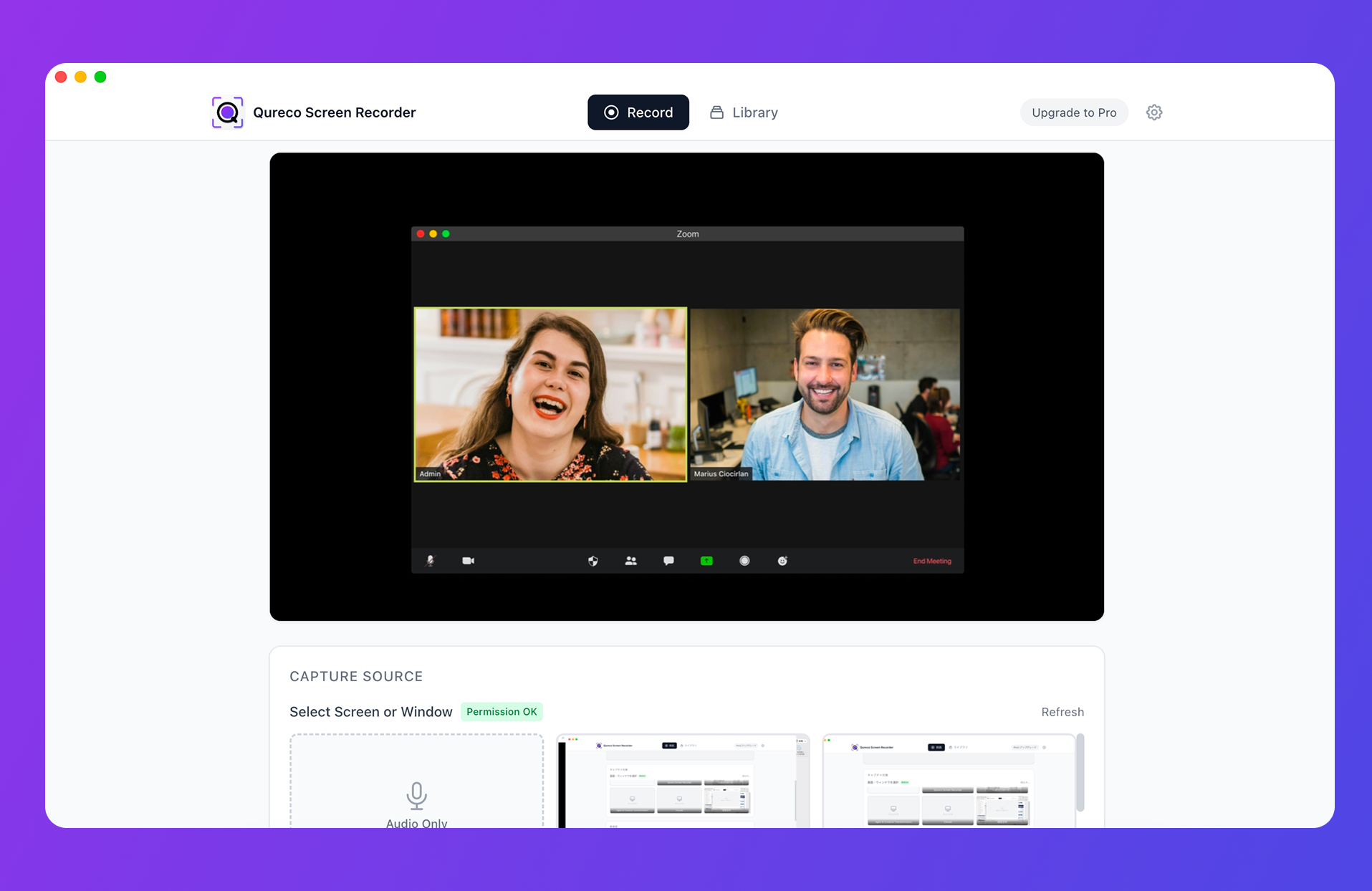
No virtual audio driver is needed, so you can launch it after sitting down and press record. There is no time limit, so a two-hour meeting does not get cut off.
| Feature | Free | Pro |
|---|---|---|
| Audio-only and screen recording | Unlimited length, no watermark | Same |
| Storage | Local | 30GB cloud with automatic backup |
| AI meeting notes (transcript, summary, speaker labels) | Not included | Auto-generate, regenerate, custom templates |
| Notion integration | Not included | Export, multiple workspaces supported |
Solve "who said that" before it becomes a problem
Audio alone does not tell you who is speaking
In an online meeting the active speaker's tile lights up, so attribution is free. An in-person recording is voices only, with none of that.
In a meeting with three people you have just met, playing it back later will not tell you who said what. All that survives is "they seemed positive", with no way to know whether the positive one was the decision-maker or the account handler. That difference matters.
Speaker labels plus one line at the start
Speaker identification in AI meeting notes separates speakers by voice. On top of that there is one practical trick.
Recording who took something on moves the work
A record of decisions with no owners gets read and nothing happens. What moves is the record that names people.
In person, commitments made verbally are especially likely to evaporate. Who was it who said "I will go and check that"? Whether that made it into the record decides how much has moved by next week.
Collect the whiteboard and handouts with the audio
Photograph the board before the meeting ends
Saying "before we finish, let me just get a photo of the board" is almost always welcomed. The other side gets a record out of it too, so refusals are rare.
Photograph printed handouts on the spot as well, rather than waiting on "I will send it over".
Put the summary, audio, and photos on one Notion page
Settle on a single destination. If you use Notion, create one page in a meetings database and put everything there.
| Page section | Contents |
|---|---|
| Summary | The three to five lines from AI notes. The first thing read on opening |
| Decisions | A bullet list. Reading only this should give you the outcome |
| Commitments | Owner and deadline. Always name who took it on |
| Whiteboard photos | The final state. In sequence if there are several |
| Handout photos | Whatever you photographed on the spot |
| Audio link | The original. The way in when something needs re-checking |
Design around the fact that only text is searchable
Photos and audio do not turn up in search. So make the summary and the decisions the entry point, with the photos and audio reachable from there.
Three months from now, looking for "the terms on that account", the only thing that will match is the text. Write the text carefully and attach the photos and audio as the original source. That division of labour is what gets a record used.
Ask for permission with the purpose attached
Say something first
In-person recording is invisible to the other side. An online meeting displays a recording indicator; a Mac on the table gives nothing away. That is exactly why a sentence is needed.
Phrasing that does not put people on guard
- Internal meetings: "I will record this so I can write it up, and I will share the notes afterwards"
- With a client: "Would it be all right if I record this so I do not miss anything? It is for our internal notes and will not go outside our team"
- If they hesitate: "Then I will just take notes on the key points. Could I photograph the whiteboard at the end?"
The third one matters more than it looks. Recording can be declined; photographing the board almost never is. Rather than all or nothing, fall back to keeping what can be kept.
What to do when the answer is no
Even a meeting you could not record does not have to end with no record.
Once the meeting is over and you are out of the building, dictate it yourself on the spot. Three minutes of "what we settled on was option A, the condition is delivery by end of September, and the open item is their quote" is enough. Three minutes while it is fresh beats thirty minutes the next day.
That is audio too, so it goes through the same transcript and summary. You lose the other side's exact words, but as a record of your own understanding it works.
Turning an in-person meeting into a record: five steps
The actual sequence, in order. It becomes automatic quickly.
| When | What you do | Time |
|---|---|---|
| Before | Set the Mac toward the middle of the table and launch the recorder | 1 min |
| Opening | Ask permission, then read out the participants' names | 30 sec |
| During | Write only your own commitments. Otherwise stay in the conversation | Not applicable |
| Before the end | Photograph the whiteboard and the handouts | 1 min |
| After | Generate the transcript and summary, paste the photos into the Notion page | 5 min |
- Before: decide where the machine sits. Look at where the air conditioning and the projector are
- Opening: the permission line and the names. This is where downstream accuracy is set
- During: the only thing your hands do is note your own commitments. Leave the speech to the machine
- Before the end: the board in its final state, and the handouts. Before they are wiped
- After: generate the summary and put it on one page with the photos. Five minutes
The "not applicable" in the During row is the point of the whole arrangement. Move the writing outside the meeting and you get the time to watch the other person back.
Summary
- Online records itself while in-person stays manual, and the consequential decisions are disproportionately in person
- Three things need keeping: speech, whiteboard, handouts. Split across three places, none of them gets used
- Placement matters more than hardware. For four to six people in an ordinary room, audio-only on the Mac you brought is enough
- In-person audio cannot attribute speakers, so use speaker labels and read out the names at the start
- The destination is one Notion page. Design around text being the only searchable part
- Ask with the purpose and audience attached. If declined, keep the board, or dictate afterwards
Try audio-only recording once at your next meeting. Three lines in a notebook become one searchable page.

Qureco Screen Recorder
Powerful screen recording app for Mac
Record meetings, let AI handle the notes, just read what arrives in Notion.
Try all features free for the first two weeks.