You want to record meetings so the notes write themselves. The tooling is easy. What stops the proposal is the question you know is coming in the leadership meeting: "Are we allowed to do that?"
Search for an answer and you mostly find advice about secretly taping your boss for a harassment claim. That is not what you are trying to do.
This is general information rather than legal advice. For anything specific to your company or jurisdiction, talk to a lawyer.
Recording a conversation you are part of is usually legal, but "usually" is doing work
One-party consent versus all-party consent
In the United States, the rule depends on the state, and there are two families of rule.
The practical rule this leads to
You could look up where every participant is sitting before each call. Nobody does that reliably.
Legal and advisable are different questions
Even where recording without notice is lawful, it can still cost you.
A client who learns afterward that you recorded them without saying so will not check the statute. An employee who finds out that a manager recorded a one-to-one will not either. The legal question and the trust question have different answers, and the trust question is the one that shows up in your work.
Under the GDPR, the question is your lawful basis
If anyone on the call is in the EU or the UK, a different framework applies, and it is not primarily about consent.
You need a documented basis before you start
| Lawful basis | When it fits | What it costs you |
|---|---|---|
| Legitimate interests | The usual choice for internal business meetings, quality review, and training | A documented balancing test, written before the call, showing your need outweighs participants' privacy interests |
| Consent | Recording is genuinely optional and declining carries no professional cost | Rarely valid for employees, because the power imbalance undermines free consent |
| Legal obligation | A sector rule requires it, most commonly in financial services | The obligation is the basis; separate consent is not needed |
The employee-consent point catches teams out. Asking your own staff to agree to be recorded looks respectful, but regulators treat consent given to an employer as suspect precisely because refusing carries risk. For internal meetings, legitimate interests with a written balancing test is usually the sturdier footing.
Transparency is a separate requirement
Whatever basis you rely on, participants have to be told that the call is being recorded and why, at or before the start. The test is whether the information actually reaches them. A clause in a privacy policy nobody opens does not clear it on its own.
If you rely on legitimate interests, participants can object under Article 21, and you have to stop unless you can show compelling grounds that override their interests. Build the ability to not record into the workflow rather than treating every meeting as automatically recorded.
Video recording carries more than audio does
Most guidance on this topic is written about recording audio. Recording an online meeting captures considerably more.
A screen recording of a video call typically contains:
- Participants' faces, where cameras are on
- Any document shared to the screen, including the client's slides and spreadsheets
- The chat panel
- Participant names and sometimes partial email addresses
Three practical habits handle it:
- Pause the recording while anything explicitly marked confidential is on screen
- Review afterward and cut the section if it got captured
- Better still, treat the recording as a record of the conversation and ask for documents through the normal channel
| Form of record | What it contains | What to watch |
|---|---|---|
| Audio only | Speech | Fewest complications |
| Screen recording | Speech, faces, shared documents, chat | The other side's material ends up in your storage |
| AI notes and transcript | Summary plus searchable full text | Trivially easy to forward. Access scope needs designing |
That last row matters more than it looks. A video file is heavy and awkward to send, which quietly limits how far it travels. A transcript is text. Once the conversation becomes text, the cost of sharing it drops to nothing, and the record spreads further than the recording ever would.
Internal meetings: check your own policy first
For meetings inside the company, the binding constraint is usually not national law. It is your employer.
The equivalent question in your own organization is whatever your handbook, acceptable use policy, or works council agreement says. Read it before you build a workflow on top of it.
Make it a policy rather than a personal habit
The opposite of recording in secret is not refusing to record. It is recording as an agreed practice.
If you are proposing automated meeting notes, decide these four things in the same proposal.
| Decision | A reasonable default |
|---|---|
| What gets recorded | Recurring team meetings and any meeting where participants agreed in advance. Never performance or disciplinary conversations |
| Who records | The meeting owner. Individual participants do not record separately |
| Where files live | A designated shared drive or database. Not personal devices |
| When files are deleted | Recording deleted once notes are approved, or a fixed 90-day retention |
Answering these upfront also answers the objection you are going to get. Resistance to recording is rarely about the recording. It is about not knowing who will watch it and for how long.
How to announce it internally
A line in the calendar invitation is enough.
"This meeting will be recorded so that notes can be produced automatically. The recording is stored in the team's meeting notes database, deleted once the notes are approved, and is not used for performance evaluation."
The last clause does the heavy lifting. Say it plainly if it is true.
Have a fallback ready for the person who objects: stop recording for a specific agenda item, or keep the written notes and drop the recording. Offering that turns the conversation away from a yes-or-no vote.
Client calls: this is a relationship question wearing a legal costume
With external participants, employment policy drops out and the relationship takes over.
People rarely say no
Teams that record client calls routinely report that refusals are uncommon. When the purpose is specific and the use is bounded, there is no downside for the other side.
What does get refused is a bare "mind if I record this?" with no stated purpose. The other person has no way to evaluate it, so the safe answer is no.
Wording you can use
Spoken, at the top of the call:
"So I can keep an accurate record of what we agree, would you mind if I record this call? It stays internal to our team and is used only for our notes."
Or in advance, by email:
Hi [Name],
So we have an accurate record of the discussion to share internally, I'd like to record our call on [date]. The recording stays within our team, is used only for meeting notes, and is not shared outside the company.
If you'd rather we didn't, just say so on the day and we'll leave it off.
Making refusal easy is what keeps the request from feeling like pressure.
If they decline
Drop it immediately. Do not ask why, and do not make the case a second time.
Then write your own notes in the five minutes after the call, while the decisions and next steps are still fresh. That covers most of what the recording would have given you.
If their company forbids it
Financial services, healthcare, government, and plenty of large enterprises have internal rules against being recorded by vendors. Their policy governs their side regardless of what your jurisdiction permits. When someone says their policy does not allow it, that is the end of the conversation.
How you record changes how much you have to explain
Once the legal question is settled, a practical one remains. Different recording methods create different amounts of explaining.
Sending a bot into the meeting
Most AI note-taking services join the call as a participant. Your attendee list now shows a name that belongs to neither company.
When the client asks what it is, the answer has several parts: which service, where the audio is processed, what that vendor does with it, and whether their own security policy permits sending call audio to a third party. Sometimes that is a short conversation. Sometimes it stops the meeting.
Recording your own machine
Recording your own screen instead adds nobody to the call. The explanation collapses to one sentence, and the file stays somewhere you chose.
| Bot joins the call | You record your own machine | |
|---|---|---|
| Attendee list | Gains an external service | Unchanged |
| What you have to explain | Vendor name, where audio goes, their data policy | That you are recording, and why |
| Where the file lives | The vendor's servers | Your device, or storage you selected |
| Host permission | Sometimes needed to admit the bot | Not needed |
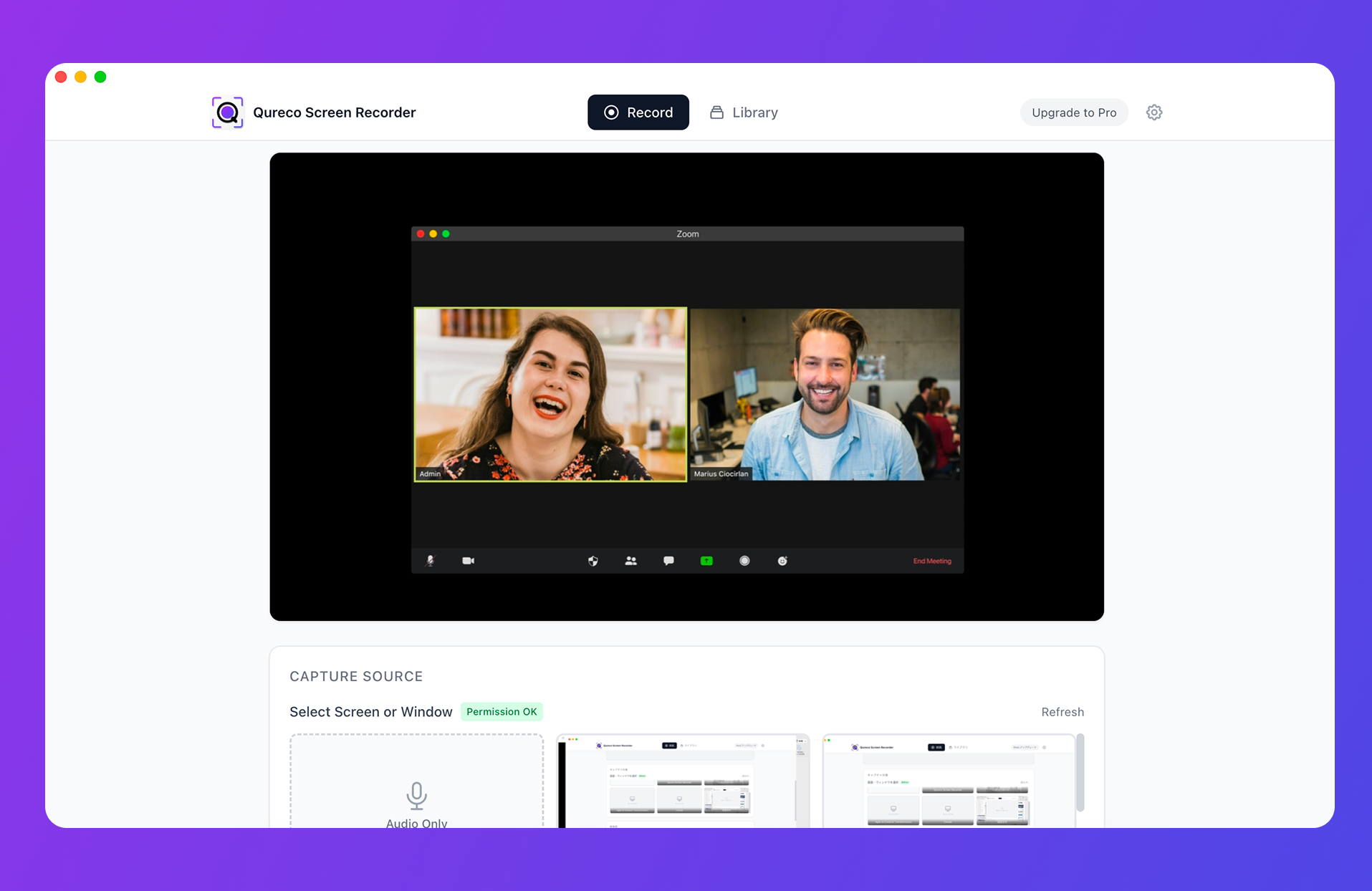
The parts relevant to this article:
- No bot joins the meeting, so the attendee list is unchanged and "I'm recording this for our notes" covers the whole explanation
- Recording is free and unlimited in length, with no watermark and no virtual audio driver to install
- You choose where files live. The free tier keeps recordings local; the Pro plan adds cloud storage. Useful when your policy dictates storage location
- AI notes and Notion sync (Pro plan), so transcripts land in a database with access controls rather than circulating as loose files
Recording is free; the Pro plan with AI notes and Notion sync is $9/month at launch pricing, with the first two weeks free.
The trouble starts when you share the file, not when you record it
In practice, recordings rarely cause problems at the moment of capture. They cause problems later.
Stay inside the purpose you stated
You said the recording was for internal notes. Using it in a case study, cutting it into a recruiting video, or circulating it as sales training material are all different purposes.
If you want to widen the use, ask again. Obvious in principle, easy to forget in the week when marketing needs a clip.
Decide storage and access before you start
Do not leave recordings on personal machines. Either the person leaves and nobody can open the files, or the files leave with the person.
Set a retention period and actually delete
Data you no longer need is pure liability.
- Recordings: delete once the notes are approved, or set a 90-day limit
- Notes and transcripts: keep for the life of the account or project, and archive only what is genuinely reference material
Without a stated period, everything is kept forever by default. Decide it at the start, when it is a one-line decision rather than a cleanup project.
FAQ
Can I share a recording I made without telling anyone?
Treat this as a relationship question before a legal one. Even where the recording was lawful, sharing it is how the other party finds out, and that is the expensive moment. For something already recorded, keep it as a personal memory aid and do not circulate it. Then start announcing recordings from the next call onward.
One team member objects to internal recording. Now what?
Ask why. The objection is usually not the recording but the fear that it feeds into evaluation, or that people will speak less freely. Stating that it is excluded from performance review, or pausing for specific agenda items, resolves most cases. If the objection stands, run that meeting without recording and keep written notes.
Can we use recordings in performance reviews?
If your organization decides that openly, documents it, and tells people in advance, it may be defensible. Repurposing recordings that were introduced "for meeting notes" is what generates backlash, and under the GDPR it also undercuts the purpose limitation you documented. Practically, keeping recordings away from evaluation is what allows the practice to stick.
Does the same apply to in-person meetings?
The consent rules do. All-party consent states cover in-person conversations, not just calls, and the GDPR does not care whether a microphone is in a laptop or a room. The difference is that a recording device is less visible in person, which makes saying so out loud more important, not less.
When should we involve a lawyer?
When a dispute is in view, when you operate in a regulated sector, when you are writing a company-wide recording policy, and whenever participants sit in jurisdictions you have not checked. A single review of the policy is much cheaper than discovering the gap later.
Wrap-up
- Recording a conversation you are part of is legal in most US states, but twelve require every participant's consent, and the strictest jurisdiction on the call effectively sets the rule
- Telling everyone, every time is the only policy that scales. It satisfies all-party consent states and the GDPR's transparency requirement at once
- Under the GDPR the question is your lawful basis, documented before the call. Legitimate interests with a balancing test usually beats employee consent
- Video recording captures more than audio: faces, shared documents, chat. Treat the recording as a record of the conversation and get documents through normal channels
- Internal meetings run on your own policy. Decide what, who, where, and how long, all in the same proposal
- Client calls are a trust question. State the purpose, make refusal easy, and drop it immediately if they decline
- Trouble starts at sharing. Stay inside the stated purpose, control access, and delete on a schedule
If what was blocking the proposal was not knowing where the risks actually sit, this should be enough to get through the meeting. Check your own handbook, and where the stakes justify it, have a lawyer look at the policy. As noted at the top, this article is general information, not legal advice.

Qureco Screen Recorder
Powerful screen recording app for Mac
Record meetings, let AI handle the notes, just read what arrives in Notion.
Try all features free for the first two weeks.