It has been sitting in your cart for three days.
The review videos make AI voice recorders look useful, and the user feedback is not bad. What stops most people is the moment they notice the subscription on top of a $159 to $189 device.
This decision turns on where your meetings happen, not on what they are about. If you talk to people in places where a laptop stays shut, a dedicated recorder earns its price. If almost everything happens in front of your computer, the capture device is already on your desk. This article breaks down the real cost of a PLAUD setup, converts the free allowance into actual meetings, and draws the line between the two cases.
The cost of an AI voice recorder is not just the device
Device prices
| Model | Price (USD) | Form factor |
|---|---|---|
| PLAUD Note | $159 | Card, attaches to the back of a phone |
| PLAUD NotePin | $159 | Wearable pin |
| PLAUD NotePin S | $179 | Wearable pin |
| PLAUD Note Pro | $189 | Card with a 0.95-inch display |
Note Pro is the newest model, with four microphones and an on-device screen for battery and recording status.
Transcription is a separate plan
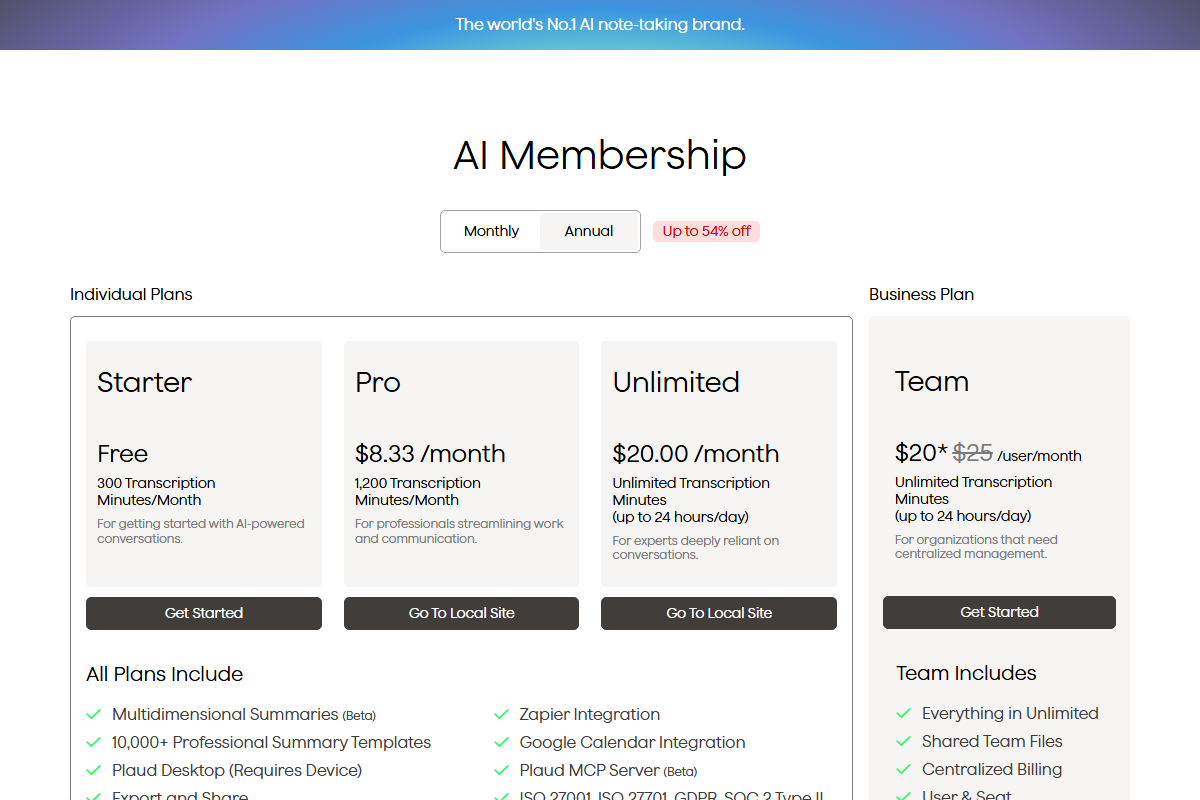
Transcription and summarization run in the cloud, so they come as a membership, independent of which device you buy.
| Plan | Price | Transcription per month |
|---|---|---|
| Starter | Free | 300 minutes |
| Pro | $8.33/month billed annually, about $100/year ($17.99 billed monthly) | 1,200 minutes |
| Unlimited | $20.00/month billed annually, about $240/year ($29.99 billed monthly) | Unlimited, up to 24 hours per day |
What year one actually costs
| Combination | Year one | Year two onward |
|---|---|---|
| Note + Starter (free) | $159 | $0 |
| Note + Pro | ~$259 | ~$100 |
| Note Pro + Pro | ~$289 | ~$100 |
| Note Pro + Unlimited | ~$429 | ~$240 |
The row that decides everything is the first one. Whether you can stay on the free Starter plan changes the total by hundreds of dollars, and that depends entirely on those 300 minutes.
How many meetings fit in 300 free minutes
Three hundred minutes is five hours. Put against a calendar, it looks like this.
| Meeting length | Starter (300 min) | Pro (1,200 min) |
|---|---|---|
| 30 minutes | 10 per month | 40 per month |
| 1 hour | 5 per month | 20 per month |
| 90 minutes | 3 per month | 13 per month |
That splits people into three groups.
- One weekly standing meeting plus a few calls: around five hours a month, so Starter holds. You pay for the device and nothing else
- Three or more meetings a week: twelve hours or more, and you run out in the second week
- Meetings every day: even Pro's 1,200 minutes covers only twenty one-hour meetings. Long sessions push you toward Unlimited
Four situations where a device clearly wins
With the money on the table, here is where a dedicated recorder does something your laptop cannot.
In-person meetings
Note Pro is specified to pick up voices at five meters in its voice-enhancement mode, with four microphones. It is built to reach the far side of a conference table, which is a harder job than a laptop's built-in microphone is designed for.
Moving around, on site, anywhere a laptop stays shut
Dictating on the walk back from a client, catching an observation while walking a shop floor: these are the cases a recorder exists for. The value is in not having to open anything.
Long sessions
Note Pro is rated for up to 30 hours of continuous recording, and up to 50 in its long-life mode. For an all-day workshop, that removes the power question entirely.
Phone calls
If the conversations that matter happen on a phone rather than a computer, a device with a call-recording mode covers something a desktop recorder does not.
If the meeting is on your screen, the recorder is already there
For anyone whose week is Zoom, Google Meet, and Teams, the picture changes.
The audio is already inside your computer
The air conditioning comes with it. So does your keyboard. PLAUD's own blog points to phone recording apps as a starting option, so recording itself is not the part you need hardware for.
A Mac app captures system audio and your microphone together
Shared screens only survive as video
"Which slide was that number on" is a question only a recording can answer. If your meetings run on shared screens, audio alone leaves a hole.
- Recording is free, with no time limit and no watermark. There is no monthly minute allowance to budget against
- There is an audio-only mode, so a conversation that needs no video can stay audio
- AI meeting notes and the Notion integration are on the Pro plan at $9 a month, free for two weeks with no credit card
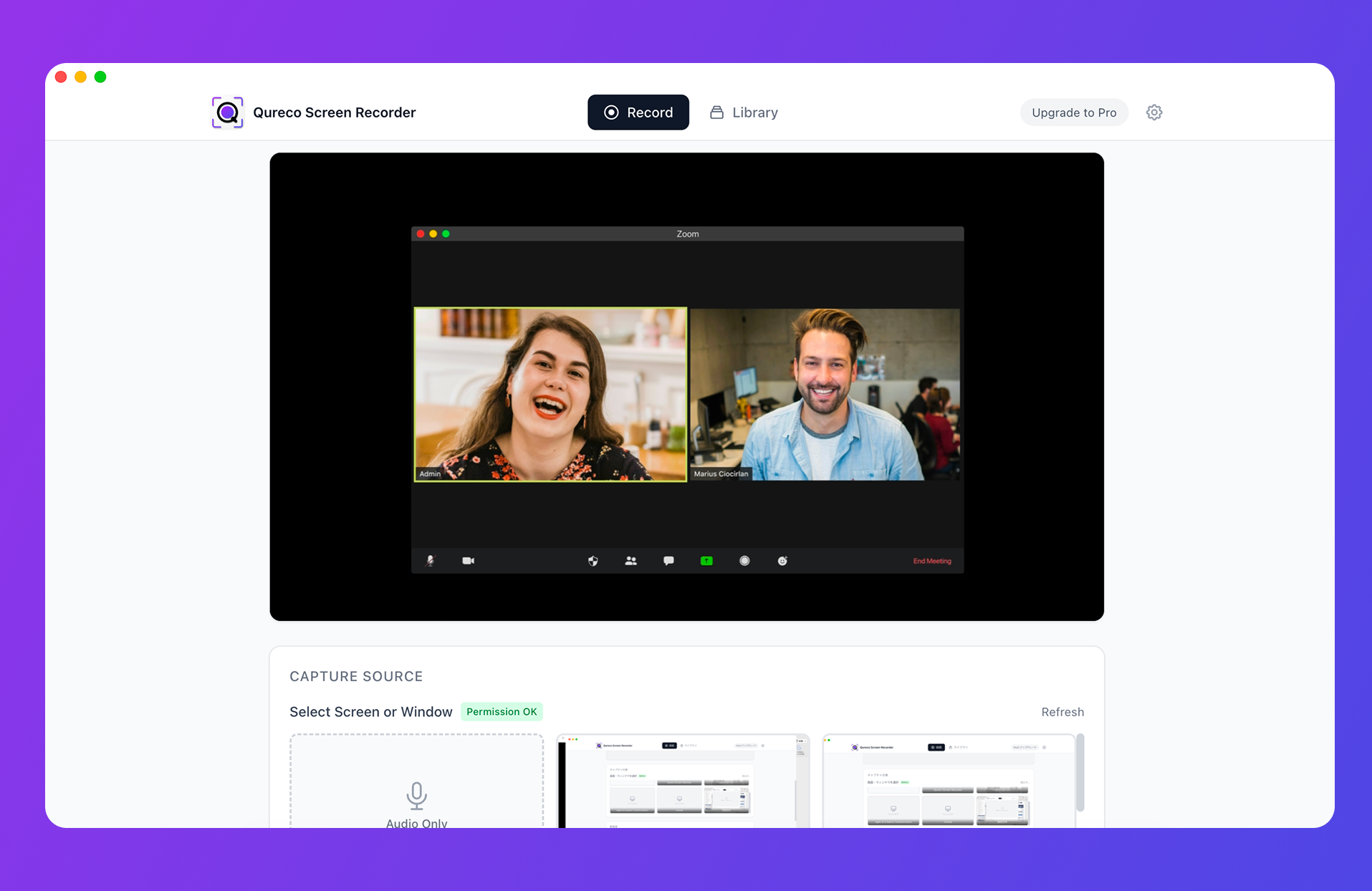
One caveat: Qureco is a macOS app, so it does nothing for you in the places where a laptop stays shut. If most of your recording happens on the road or on a client's site, the comparison in this article does not apply and the device is the straightforward answer.
Three questions to answer before you buy
Above 300 and the device price is not the end of it. Plan on roughly $100 a year, every year.
If eight out of ten conversations happen at your desk, a recorder is one more thing to carry. If half of them happen away from it, your computer is not an option at all.
Meetings that run on shared screens leave information behind if you keep only the sound.
| Minutes | Location | What you need | Best fit |
|---|---|---|---|
| Under 300 | Mostly at a computer | Screen too | Record on the computer |
| Under 300 | Mostly in person | Audio only | Device + free Starter |
| Over 300 | Mostly in person | Audio only | Device + Pro |
| Over 300 | Both | Screen too | Use both |
Using both is a legitimate answer
You do not have to pick one. Splitting by location is the arrangement that holds up in practice.
- In person, on the move, on site: the device
- Online meetings: record on the computer, screen included
FAQ
For in-person conversations with someone nearby, it often is. It stops being enough across a large room, with several people talking at once, or over long sessions. Record once on your phone, listen back, and buy only if what you hear falls short.
Accuracy depends more on the audio coming in than on the engine behind it. A close microphone, low noise, and speakers who do not overlap bring every method close together. Distance and room noise are where dedicated microphones pull ahead. An online meeting, where the audio can be taken straight from inside the machine, is already a favorable case.
People whose meetings are nearly all online and run on shared screens. The audio survives and the slides do not, so they end up recording on the computer as well.
The cost and location logic carries over. The Mac path in this article does not. On Windows, check first whether your recorder of choice can capture system audio.
Starter stops transcribing for the rest of the month. You can still record, but the step that turns it into text pauses. If your important meetings cluster late in the month, watch the order you spend the allowance in.
Summary
- The cost is the device plus a plan. PLAUD hardware runs $159 to $189, and transcription is Starter free (300 min/month), Pro $99.99/year (1,200 min), or Unlimited $239.99/year
- 300 free minutes is five one-hour meetings a month. A single weekly meeting fits inside the hardware price. Three a week does not
- Devices win on in-person, mobile, long-form, and phone calls. Five-meter pickup and 30-hour battery are built for exactly those
- When the meeting is already playing on your computer, there is no reason to push the audio into the air and catch it again. Capturing it inside the machine is cleaner and keeps the shared screen with it
- Decide with three numbers: minutes per month, where you record, and whether you need the screen
Before you go back to the cart, record one meeting with what you already own. Whatever is missing when you listen back is your answer.

Qureco Screen Recorder
Powerful screen recording app for Mac
Record meetings, let AI handle the notes, just read what arrives in Notion.
Try all features free for the first two weeks.