You are three meetings into the day and you can no longer recall what was decided in the first one. The previous call ended ten seconds before this one started, so there was no moment to sort anything out. By evening you have a page of fragments and a vague sense that something got agreed.
This article does not contain tips for taking notes faster. Abbreviations, shorthand, and text expanders do not fix this situation.
Falling behind is not a speed problem
The missing time is processing time, not writing time
Notes taken during a meeting are not usable as they stand. They are fragments in the order they occurred, with decisions, context, and your own commitments all mixed together. Read them back a week later and some lines will mean nothing even to you.
Turning that into a record takes a few minutes of work after the meeting. Only a few. But those few minutes have nowhere to live on a calendar built out of consecutive half hours.
So the bottleneck is not the writing. It is the absence of anywhere to process what you wrote.
Listening and writing are not simultaneous activities
There is a second, more basic constraint.
Write while following the discussion and you lose the few seconds of speech that pass while your hands are moving. Try to reconstruct them and you miss what comes next. Give the conversation your full attention and nothing gets written.
The third meeting is hard for a physiological reason
There is experimental evidence for why recall degrades across a run of meetings.
What they found:
- In the back-to-back condition, average beta wave activity, associated with stress, rose as the meetings went on. Stress accumulated
- With breaks, beta activity dropped during the break, producing a reset, and the average held steady across all four meetings
- The back-to-back condition produced negative frontal alpha asymmetry, a state linked to lower engagement. With breaks, the asymmetry was positive
Why the usual remedies do not work
| Common remedy | Why it fails here |
|---|---|
| Learn to take notes faster | Leaves less attention for the discussion, and creates no processing time |
| Write nothing, then do it all later | By the third meeting the memory has faded, so there is nothing left to write from |
| Just record the audio | Listening back requires time you do not have either |
| Assign a note-taker | In status and decision meetings everyone is a participant. Your own commitments still only exist in your head |
That last row gets overlooked. Even with a designated scribe, the task you agreed to take on and the concern only you noticed live nowhere but your own notes.
Stop writing during the meeting
Change what the question is
Machines are better at the transcript than you are. They capture every speaker, produce full text, and generate a summary. What humans should be doing in the room is judging, reading the reaction, and deciding. Putting your hands down is how you get that time back.
Write exactly two kinds of thing
Writing nothing at all feels wrong to most people, so restrict it to two categories instead.
The instant you say "I'll check on that," write one line. This is a task, not a record, and capturing it in the moment is faster than digging it out of a transcript later.
Points where the other side's understanding seems to differ from yours. This is less a note than a prompt to speak up. Realizing it afterward is too late.
Nothing else gets written. Not the substance of what people said, not the background, not the numbers.
| Write during the meeting | Do not write during the meeting |
|---|---|
| Tasks you took on | Summaries of what was said |
| Mismatches in understanding | Decisions (the notes will have them) |
| Questions to raise now | Background, figures, proper nouns |
Not writing down decisions may feel reckless, but decisions are exactly what AI notes capture most reliably. Written by hand in a hurry, a decision tends to lose its conditions and survive as "we're going ahead with X."
Everything else goes to the recording
With the meeting recorded, the speech is all preserved. AI notes turn it into a list of decisions and action items without you.
Because your hands are free, you are actually in the conversation from start to finish. The writing has simply moved outside the meeting.
Build ten minutes between meetings
Once the writing lives outside the meeting, it needs somewhere to go.
Ten minutes is processing time, not just a break
What the Microsoft study showed is that a gap stops stress from accumulating and changes the state you carry into the next meeting. That gap does not have to be spent resting. It is also where the previous meeting gets closed out.
Both Google Calendar and Outlook can shorten meetings automatically, turning 30 minutes into 25 and 60 into 50. That setting is the realistic starting point, because it changes nothing about how many meetings you have.
What the ten minutes are for
| Minutes | What you do |
|---|---|
| First 3 | Read only the decisions and action items in the AI notes. Do not read the body |
| Next 4 | Move your own items into your task manager or calendar. Send anything that needs sharing |
| Last 3 | Open the next meeting's agenda and materials. Write one line on what you are there to decide |
When the gap is impossible
Some days you cannot create it, particularly when other people control the times.
Push it to tomorrow and you will be reading the notes without any memory to attach them to. Items will appear that you cannot resolve without watching the recording, and fifteen minutes turns into an hour. Same day, the notes trigger recall instantly.
What a six-meeting day looks like
| Time | What happens |
|---|---|
| 10:00-10:25 | Meeting 1 (shortened to 25 min) |
| 10:25-10:35 | Process, 10 min |
| 10:35-11:00 | Meeting 2 |
| 11:00-11:10 | Process, 10 min |
| 11:10-11:35 | Meeting 3 |
| 11:35-13:00 | Lunch. Clear anything left over from the morning |
| 13:00-16:00 | Meetings 4 to 6, same 25 + 10 pattern |
| 17:45-18:00 | 15 minutes before finishing. Leftovers and tomorrow's prep |
The number of meetings has not changed. The only difference is that each one is now followed by ten minutes.
When meetings are back-to-back, the recording method has to be identical every time
Everything above assumes every meeting gets recorded the same way. This is the part that breaks first.
Varying conditions kill the routine
A single day contains an internal standup, a customer call on their link, a one-to-one, and a partner meeting. Some you host and some you do not. Different platforms, different permissions, recording disabled on some accounts.
Deciding "can I record this one?" before every call is itself a cost, and it is the cost that ends the habit inside two weeks. On a packed day, removing decisions matters more than optimizing any single step.
The friction of sending a bot
Most AI note services join the meeting as a bot. Accuracy is good, but on a back-to-back day a different cost accumulates.
The attendee list shows a name belonging to neither company, so external participants ask what it is. Once a day, fine. If four of your six meetings are external, that is four explanations, and if the client's security policy restricts sending audio to third parties, some of those conversations stop there.
Recording your own machine
Recording your own screen, rather than using the platform's recording feature or a bot, keeps the procedure identical regardless of the meeting. No host permission, no extra attendee.
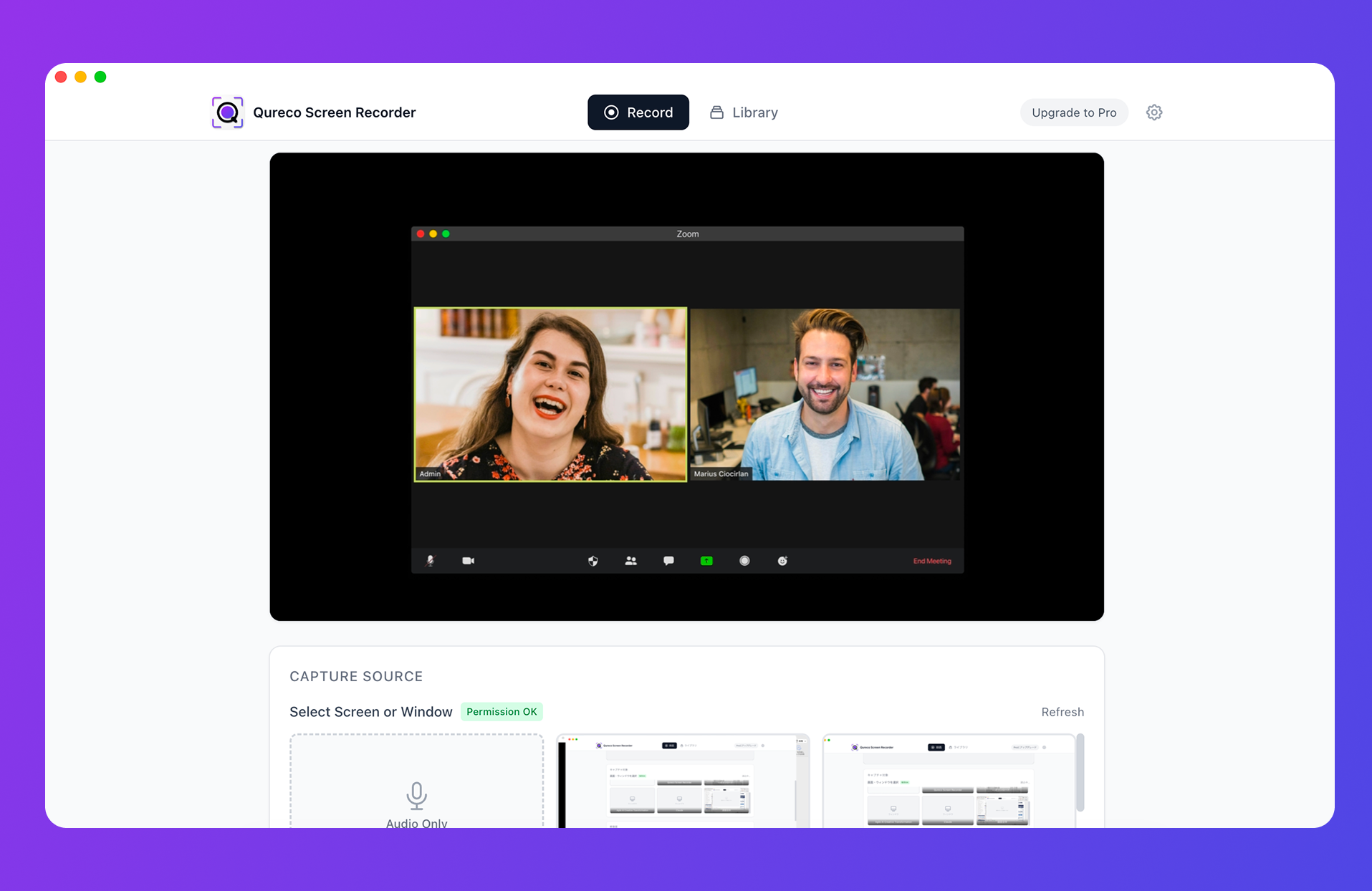
The parts that matter for running a stacked day:
- Recording is free and unlimited in length. However many meetings run back to back, nothing cuts off and there is no watermark
- No virtual audio driver to configure. You capture the other side's voice (system audio) and your own without installing BlackHole or similar
- Host permission is irrelevant, so a customer-hosted call follows the same steps as your own standup
- AI notes generated from the recording (Pro plan), with speaker identification and decisions and action items separated out
- Notion integration (Pro plan), so notes land in one database and your ten minutes always open in the same place
Decide in advance what gets recorded
To keep the decision out of the moment, set the rule ahead of time.
- Record everything. Strongest as a routine because there is no decision at all. Exclude performance and disciplinary conversations without exception
- Record by category. For example: external meetings and any internal meeting where decisions are made. Not casual catch-ups
Either works. Deciding in the moment does not.
And tell people you are recording. One sentence at the start covers it.
"So I can keep an accurate record, would you mind if I record this? It's for our internal notes only."
Keep the recordings from becoming an archive nobody opens
This is where people who start recording usually stall.
Do not build the workflow on rewatching
Treat rewatching as the exception. In normal operation you read the decisions and action items in the AI notes and nothing else.
You go back to the recording when a misunderstanding surfaces, when someone questions how a decision was reached, or when you need to bring a new joiner up to speed. A few times a month at most. Believing that recordings are worthless unless rewatched is what makes them feel like a burden.
Put them somewhere findable
Files scattered per meeting are unsearchable when it counts. If finding "that call about the migration, week before last" takes five minutes, the archive stops being used.
Having exactly one place to open during your ten minutes is what makes the routine survivable.
Set a deletion rule
Video is heavy. Keep everything by default and storage management becomes its own job.
- Delete the recording once the notes are approved, or
- Set a 90-day retention and let anything older go
Keep the text, drop the video. That covers most cases.
FAQ
Should we record every meeting?
Recording everything is the strongest routine because it removes the decision entirely. Exclude performance and disciplinary conversations. Check your employee handbook first, since some organizations restrict recording on their own systems.
I record meetings but never watch them back
That is fine. This workflow does not depend on rewatching. You read the decisions and action items; the video sits there as somewhere to return to if a question comes up.
What about in-person meetings?
If you have your Mac with you, an audio-only recording supports the same routine. You lose the shared screen, but decisions and action items come through. If a whiteboard was used, take one photo at the end and attach it to the notes.
Won't sitting there without writing look disengaged?
It can, on camera. The fix is a sentence at the start: "I'm recording this and turning it into notes afterward, so I'm just going to listen." In practice most people read that as attentiveness rather than the opposite.
My team won't agree to ten-minute gaps
Start with the automatic shortening setting alone, 30 minutes to 25. It changes nothing about meeting volume, so it rarely draws objections. Prove it on your own calendar first; the Microsoft EEG study is useful material when you do make the case.
Wrap-up
- The cause is the shape of the calendar, not your typing speed. There is nowhere to process what you wrote
- Losing the thread by the third meeting is not a discipline problem. Stacked meetings produce it (Microsoft's EEG study)
- During meetings, write only what you agreed to do and where understanding diverges. The transcript is the machine's job
- Take ten minutes after each meeting, or fifteen before you finish on the days you cannot. Read only decisions and action items
- The recording method has to be identical across every kind of meeting, or the routine stops
Open tomorrow's calendar and switch your 30-minute meetings to 25. If you already know what goes in the ten minutes, the day's records will be finished by the time the day is.

Qureco Screen Recorder
Powerful screen recording app for Mac
Record meetings, let AI handle the notes, just read what arrives in Notion.
Try all features free for the first two weeks.