"An AI bot from your company joined our call last week. What was that?"
A client asks you this, so you start asking around. Sales uses a browser extension. Engineering sends a bot into meetings. One of the executives carries a card-sized AI voice recorder. Nobody at the company knows who is recording which meetings, or with what.
If you're looking for an AI meeting notes policy, there's a good chance you're starting from a situation like this. AI use the company doesn't know about is called "shadow AI," and it has become one of the main ways information leaks out.
- The five ways employees capture meetings with AI, and where each one can be controlled
- A checklist for deciding which tools to approve
- A policy template you can copy and hand out
- Four steps to inventory shadow AI
AI notetakers come in five forms
Before writing rules, it helps to see that "AI meeting notes" covers several different mechanisms. Where the data goes, and where the company can step in, depends on which one.
| Method | Typical example | Visible to the meeting app? | Where the company controls it |
|---|---|---|---|
| Meeting bot | An AI joins as a participant | Yes (appears in the participant list) | Meeting app admin settings |
| Calendar integration | Reads calendars and sends a bot automatically | Yes (but the employee may not notice it joining) | Connected-app management in Google Workspace or similar |
| Browser extension | Captures captions or the screen | No | Browser extension policy |
| Desktop app | Records or processes audio playing on the computer | No | Rules for installing apps on work devices |
| AI voice recorder | Records in-person meetings on a dedicated device | No | Rules for bringing and using devices |
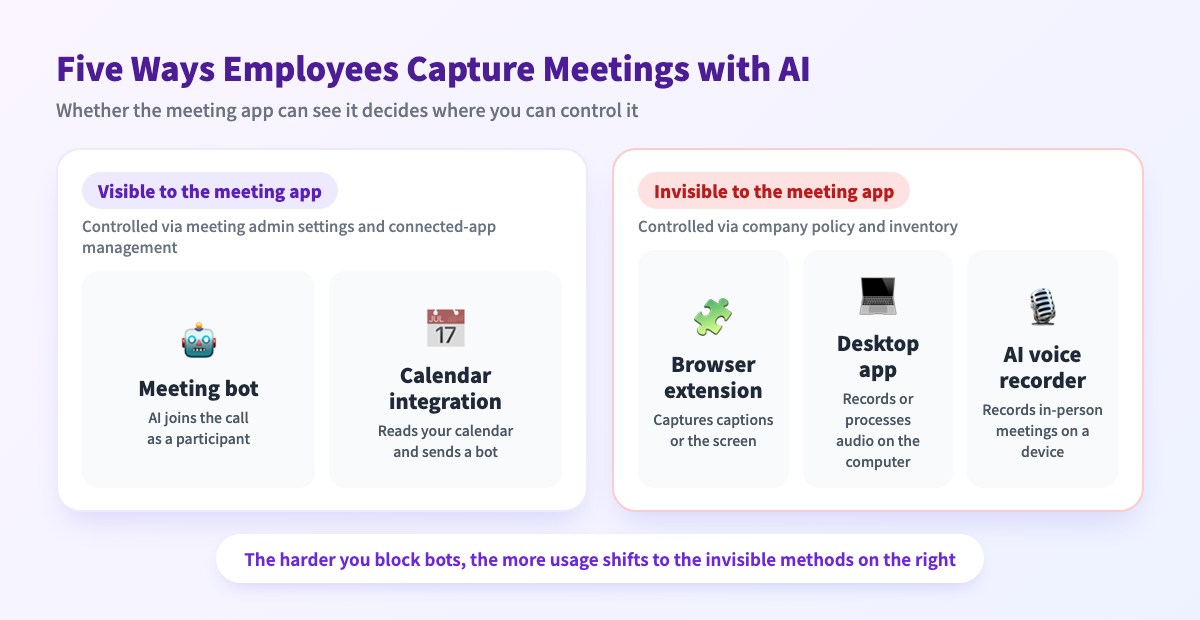
Blocking bots pushes usage toward what you can't see
Why decide now
Public bodies are already treating this as a real risk.
Manage with an approved list, not a blanket ban
The first decision is whether to ban or allow. There are roughly three options.
| Option | What happens | When it fits |
|---|---|---|
| Blanket ban | The note-taking burden remains, so usage drifts to invisible methods and personal accounts | Regulated industries that need a short pause while rules are written |
| Look the other way | The current patchwork continues, and no one owns an incident | Not recommended |
| Approved list | Decide which tools are allowed and under what conditions; everything else needs a request | Most small and mid-sized companies |
Bans work poorly for AI meeting notes
Banning AI doesn't remove the work of taking notes. And as the table above shows, extensions, desktop apps, and voice recorders are invisible to the meeting app, so there's little way to check whether a ban is being followed.
What works for smaller companies: an approved list plus exceptions
So how do you decide what to approve? Use the checklist below.
Checklist for approving an AI notetaker
Here are six things to confirm before approving a tool. All of them can be checked in the terms of service, the privacy policy, or the admin screens.
| # | Area | What to confirm | Where to look | Hold off if |
|---|---|---|---|---|
| 1 | Training | Recordings, transcripts, and notes are not used to train AI | Privacy policy, data use page | It says data is used for training with no way to turn it off |
| 2 | Storage and processing | Which provider and country store the audio and notes, and where they're processed | Subprocessor and international transfer sections | Nothing is stated |
| 3 | Deletion | Items can be deleted individually; when data is removed after cancellation | Terms, retention section | No deletion method or timeline |
| 4 | Sharing and access | Link visibility, passwords, and the ability to revoke a link | Help docs, the actual UI | Anyone with the link can view and it can't be revoked |
| 5 | Accounts and permissions | Works with a company account; how much calendar or drive access it requests | The permission screen when connecting | It asks for far more access than it needs |
| 6 | Visibility to participants | Whether others can tell they're being recorded, and how to notify them | Try it | It's invisible and there's no notification rule |
"Used to improve our services" needs a follow-up question
Free and business plans can have different terms
Some services handle training or admin controls differently depending on the plan. Treat the free plan an employee signed up for and the business plan the company would buy as two separate things. Write the plan name, not just the tool name, on your approved list.
A policy template you can use as is
Keep the policy to one page. Rules written as actions get read; rules written as legal clauses don't. Copy the template below and fill in the parts in [brackets].
AI Meeting Notes Policy ([date] version)

1. Purpose
   Make meeting notes easier while protecting client and employee information.

2. Approved tools
   - Approved: [tool name / plan]
   - To use another tool, submit a request to [contact].
   - Use your company account. Do not use personally registered accounts.

3. Before recording
   - Internal meetings: add "This meeting will be recorded for notes" to the invite.
   - External meetings: tell the other party at the start and get their OK.
   - If they decline, or their company prohibits recording, don't record.

4. Meetings not to give to AI
   [e.g. performance reviews and hiring decisions, personal health or family
    matters, M&A or unpublished financials, meetings a client asked not to record]

5. No pasting into personal AI services
   Do not enter recordings, transcripts, or notes into personal AI accounts.

6. Storage and sharing
   - Where notes are kept: [e.g. the meeting notes database in Notion]
   - Get [manager]'s OK before sharing outside the company.
   - If you create a share link, check who can view it and revoke it when done.

7. Retention and deletion
   - Audio and video: delete [e.g. 30 days after notes are finalized].
   - Notes: follow the company's document retention rules.

8. Role changes and departures
   Move recordings and notes to [handover owner] or delete them.

9. If something goes wrong
   If you enter or share something by mistake, tell [contact] right away.
   People who report early will not be blamed.

10. Review
    Review the approved list and this policy every [3 months].
Keep the last line of item 9. If people feel they need to hide a mistake, incidents go unreported and grow.
Set exceptions by meeting type
If every meeting gets the same treatment, everything ends up held to the strictest standard and the rules stop being followed. When filling in item 4, sorting by meeting type makes it easier.
| Meeting type | Record? | AI notes? | Where to keep it |
|---|---|---|---|
| Internal standups and status updates | Yes | Yes (approved tool) | Shared internal space |
| Client calls and sales meetings | Yes, after the client agrees | Yes (approved tool) | Limit access to the account team |
| HR, legal, unpublished information | Generally no | No | If recorded, keep it on the device |
The notice can be one line
Four steps to inventory shadow AI and run the policy
A policy that's only distributed won't stick. Broken into steps that one or two people in IT or operations can run, it looks like this.
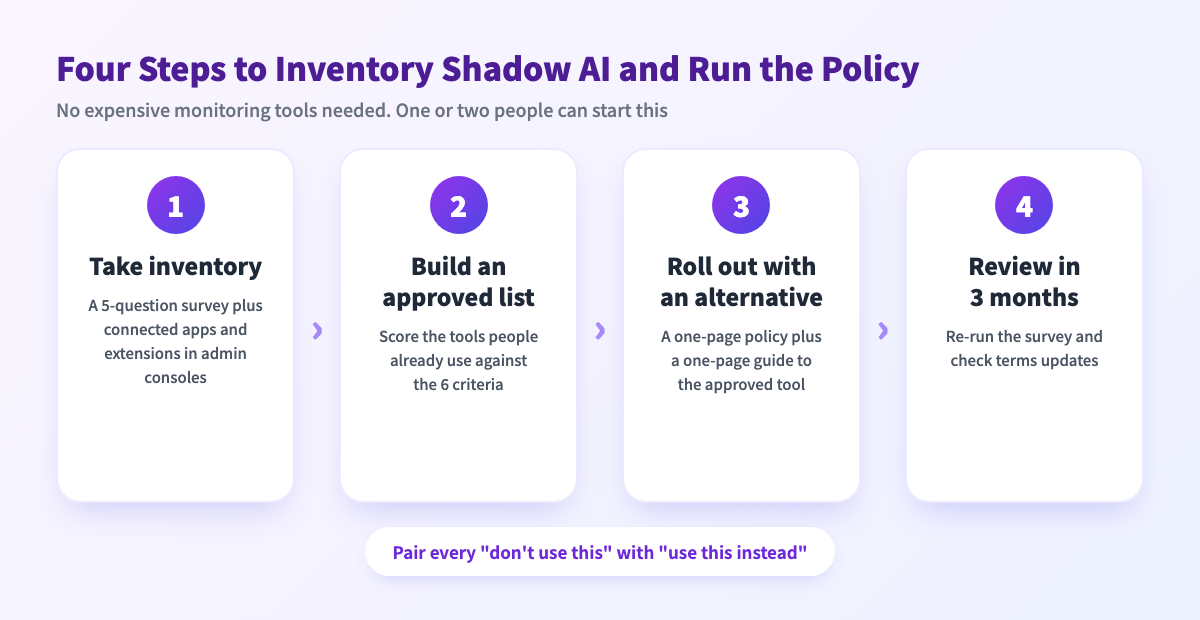
Step 1: Take inventory of what's in use
- Do you use any tool to record or take notes in meetings? (Name it)
- Which method? (Bot, extension, app, voice recorder, or pasting into ChatGPT etc.)
- Company account or personal account?
- Do you use it in external meetings too?
- Where do you keep the notes and recordings?
Also check what the admin consoles can show you:
- Google Workspace: the Admin console lets you review and restrict third-party apps that access Workspace data (Google Workspace Admin Help). Calendar-connected notetakers often show up here
- Managed Chrome: extensions can be put on an allowlist with policies (ExtensionInstallBlocklist / ExtensionInstallAllowlist) (Google Cloud Blog)
- Microsoft Teams: check the meeting policy that governs outside bots (Manage external bots and their access to meetings)
Step 2: Build the approved list
Step 3: Roll it out with an alternative
"Stop using this tool" on its own creates pushback. Pair it with "use this instead, and here's how it saves you time." Handing out the one-page policy together with a one-page guide to the approved tool works well.
Step 4: Review in three months
AI notetakers change features, plans, and data terms often. Re-run the survey every three months and decide whether newly adopted tools belong on the list. Recording each tool's terms-of-service date on the list makes changes easier to spot.
If you approve a tool that records on the employee's own device
Qureco, the Mac app we make, is this type of tool. Run through the checklist, it looks like this, based on our privacy policy (last updated July 2026):
| Area | Qureco |
|---|---|
| Training | States that recordings and notes are not used to train AI models |
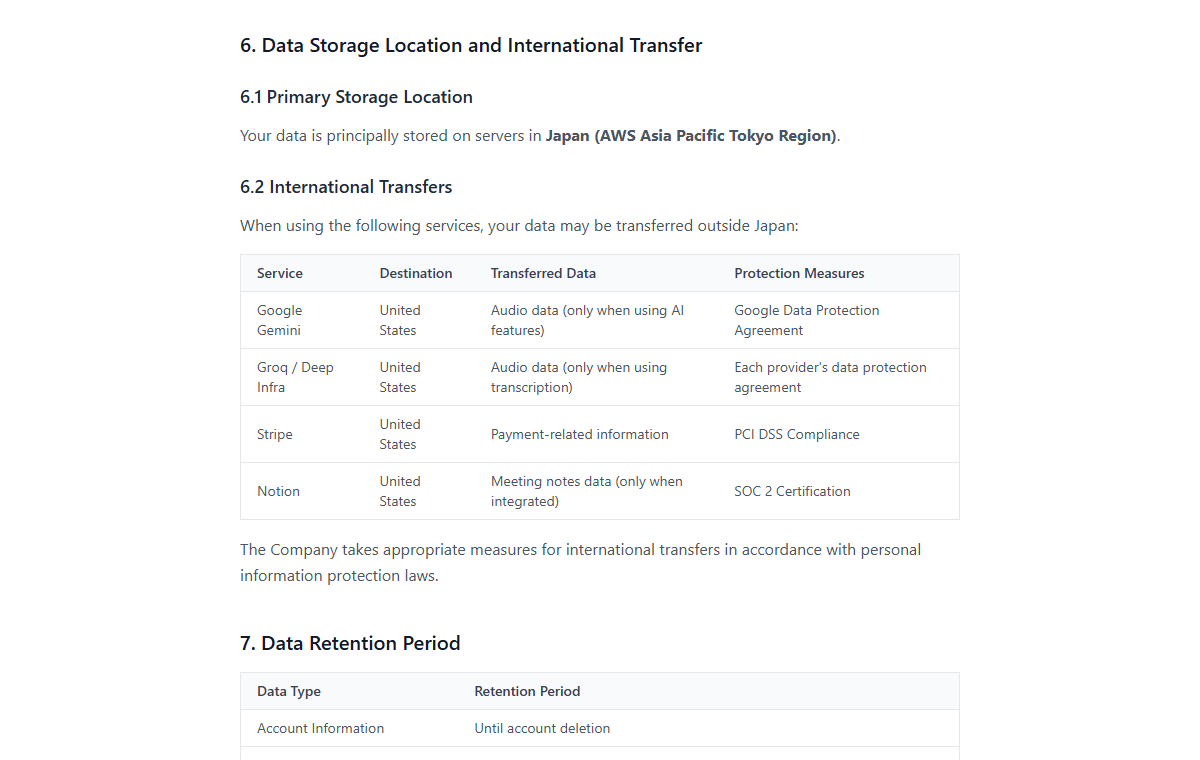
| Storage | The free plan saves locally on the Mac and nothing is sent to our servers. Pro cloud storage is principally in Japan (AWS Tokyo region) |
| AI processing | AI features are optional; if you don't use them, nothing is sent to outside AI services. Generating AI notes sends audio to processing services in the US |
| Deletion | Cloud recordings, AI notes, and transcripts are deleted within 30 days of account deletion |
| Sharing | A share link exists only if you create one; you can add an optional password and revoke it anytime |
| Visibility | No bot joins, and no participant is added in the meeting app, so you notify people yourself |
Recording is free, and the Pro plan with AI notes and Notion export can be tried free for two weeks with no credit card, which makes it easy to test before you approve it.
FAQ
What about employees using recording apps on their personal phones?
Cover them under items 5 (no pasting into personal AI) and 7 (retention and deletion). Banning the recording app itself is harder to enforce than "don't give the audio to personal AI" and "delete it after the retention period."
What if a client brings an AI notetaker bot to the meeting?
Your policy doesn't apply to them. But if your confidential information will come up, it's not rude to ask, "Could we skip the recording today?" Having your own list of meetings not to give to AI makes that call easier in the moment.
Should free plans be banned outright?
Not necessarily. Judge by checklist items 1 to 3 (training, storage, deletion), not by price. Since terms can differ by plan, list the plan name on your approved list.
Does this need to go in the employee handbook or work rules?
It depends on how your existing policies are structured. Some companies put it in the handbook, others keep it as an operating rule under the information security policy. If you plan to tie it to disciplinary action, talk to an employment lawyer or HR advisor first. The template here assumes you start with an operating rule.
Summary
- AI notetakers come in five forms: meeting bots, calendar integrations, browser extensions, desktop apps, and AI voice recorders. The last three are invisible to the meeting app
- Now that Teams and others can block bots, usage tends to shift to invisible methods and personal accounts. Cover it with a company policy, not just meeting settings
- An approved list plus exceptions gets followed more than a blanket ban
- Approve tools on six criteria: training, storage and processing, deletion, sharing, account permissions, and visibility to participants
- Keep the policy to one page and review it every three months
This week, try sending the five-question survey from Step 1. Once you know what's in use, the approved list and the policy are already half done.

Qureco Screen Recorder
Powerful screen recording app for Mac
Record meetings, let AI handle the notes, just read what arrives in Notion.
Try all features free for the first two weeks.