Seven minutes until the standing meeting.
You cannot remember what was decided last time. You open the notes, scroll, and find a wall of who-said-what with no obvious place to start. So you go in cold and wait for someone else to open with "where did we land on this?"
Running in unprepared is not a time problem
Trying to re-read everything means reading none of it
Most advice on preparation says to review the previous minutes. Fair enough, but if an hour-long meeting produced three thousand words, almost nobody gets through that beforehand.
Four out of five people have sat through a meeting they called a waste
"The agenda arrives with no time to think"
The free-text answers in the first survey include these.
- "The agenda gets handed to us at the last moment, so nobody has any time to think" (woman, 30s)
- "The organizer's lack of preparation, and poor facilitation" (man, 60s)
- "It felt like we had not aligned enough in advance" (woman, 30s)
What preparation fixes, and what it does not
One caveat: some of this does not move no matter how well a participant prepares.
| Problem | Fixed by participant prep |
|---|---|
| You cannot remember what was decided | Yes |
| You get asked about your action item and cannot answer | Yes |
| The discussion loops back over last time | Partly |
| The meeting has no defined purpose | No, that is an agenda problem |
| Too many people for anyone to speak | No, that is a format problem |
A meeting with no purpose does not improve because you read more. The first three rows are what this article is for.
Look at three things, nothing else
1. What was decided
Hold those and you are not the person who reopens them.
2. What carried over
Whatever did not finish last time: who owns it, by when, where it stands now. Most of a recurring meeting's time goes here.
3. What was assigned to you
Your slice of the previous item. Get it to the point where you can say it in one line. It does not have to be done. "Going out Wednesday" is enough to keep things moving.
When you cannot find them
| What you need | Where it should live | Fallback |
|---|---|---|
| Decisions | The decisions section of the notes | The recap someone sent by email or chat |
| Carried-over items | Task tracker or the end of the notes | Search your own sent mail around that date |
| Your assignment | Your own notes | The calendar invite, or last time's chat thread |
Decide what you are not reading
Narrowing to three means naming what you skip.
- The full transcript. Who said what does not change today's discussion
- Openings and small talk. The first five minutes are rarely worth revisiting
- Every page of the deck. Only the pages tied to today's agenda
How the three minutes go
Putting a clock on it is what makes it happen.
0:00-1:00 open the decisions and the open items
Open only those two sections. If the notes are somewhere searchable, this is one search on the meeting name and one click on the latest entry.
1:00-2:00 reduce your own item to a line
"Quote is with their side, answer due Friday." State and next date, in one line. Write it down rather than holding it in your head, so you can read it out when asked.
2:00-3:00 write down the one thing you want to ask
Separate from the agenda, pick one thing you want answered. Having it means you do not wait for an opening to speak.
On days with no three minutes, look at your own item only
When nothing was written down last time
This is where most preparation advice stops being useful: there are no minutes, or there are minutes with no decisions in them.
If there is a recording, watch the last five minutes
Work backwards from chat and the calendar invite
The short recap someone posted to Slack or Teams right after, or the agenda appended to the calendar invite, is often more accurate than the formal notes. Searching chat around the date of the last meeting is the fastest route.
Ask, in one line
For client meetings with no record, asking beats guessing.
Before today's call, one quick check: my understanding is that we agreed to proceed with the X approach. Is that right?
This does not read as unpreparedness, it reads as alignment. It also costs the other side far less time than fifteen minutes of reconstruction at the start of the call.
Record today for the sake of next time
If the absence of notes is what hurt you, start being the person who leaves them. Whether next month's version of you gets three minutes depends on how today's meeting is kept.
Internal standing meetings and client calls need different things
For standing meetings, the open items carry the weight
Internally, the same people are tracking the same threads. What matters is the delta since last time, which is the open items. Decisions have been accumulating, so the most recent round is enough.
For client calls, it is what they hesitated over
In a sales conversation, the other side's hesitation is the agenda for next time. Price, timing, an internal approval. Miss it and you deliver the same pitch twice.
| What to review | Internal standing meeting | Client call |
|---|---|---|
| Decisions | Most recent round | Cumulative, from the first call |
| Open items | Everyone's | Yours to bring back |
| Their concerns | As needed | Always |
| Attendees | Fixed, skip it | Check whether the same people are joining |
Recording meetings so that three minutes holds
Decisions and open items in one searchable place
Stop paying the writing cost after the meeting
The honest obstacle is that nobody has time to tidy notes afterwards. Drafts pile up unfinished, and by the next meeting there is nothing readable, which is the loop that keeps this broken.
- No bot joins the call. You record on your own machine, so no stranger shows up in the participant list
- Recording is free, with no time limit and no watermark
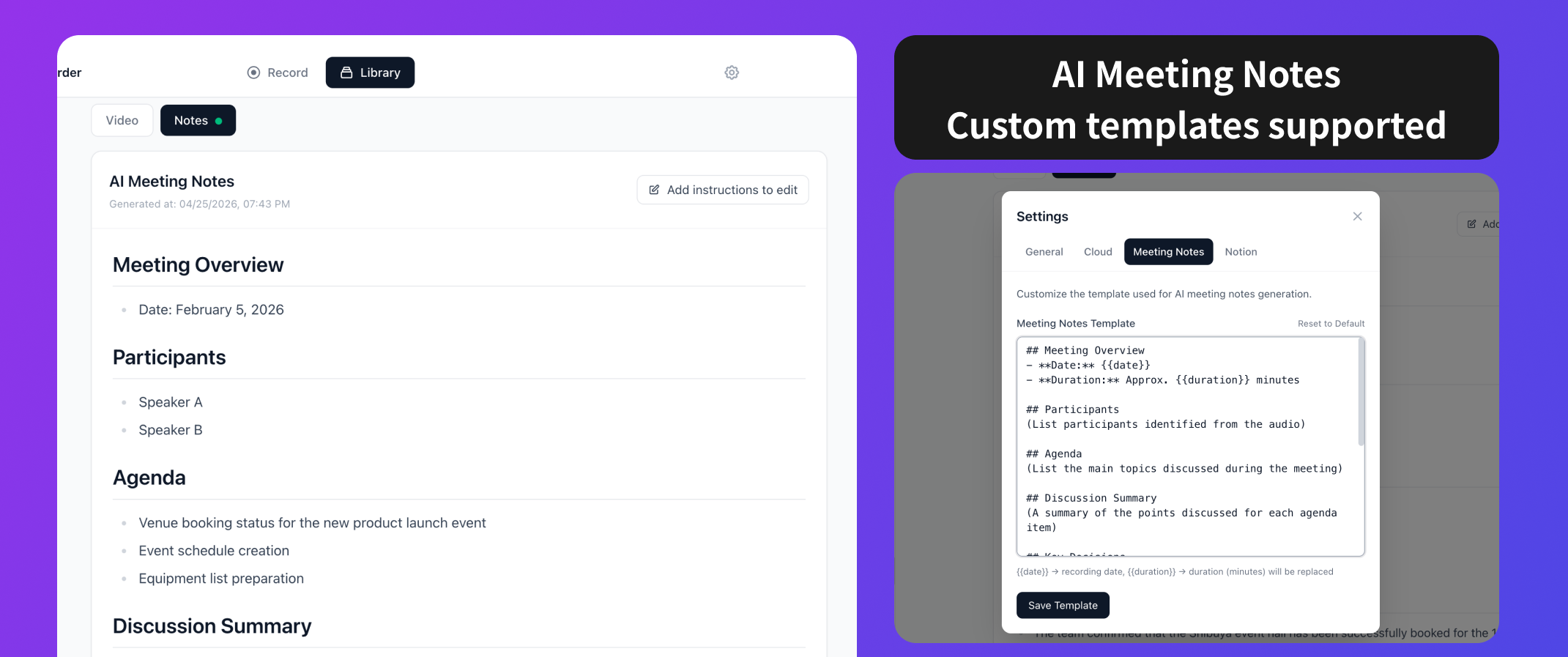
- AI meeting notes and the Notion integration are on the Pro plan at $9 a month, free for two weeks with no credit card, and the notes go straight into a Notion database
- The note template is configurable, so fixing a decisions section and an open-items section means the place you look before a meeting is the same place every time
Once it lands in Notion, preparation is one screen
With notes collecting in a Notion database, you search the meeting name and open the latest entry. Decisions and open items sit in the same position every time, so none of the three minutes goes to finding the place to read. That is when three becomes one.
FAQ
Get your own item into one line. If even that is out of reach, open the open-items section between the start of the call and your first turn to speak. Other people cover the decisions. Nobody covers your assignment.
Especially then. When agendas arrive late, nobody in the room is prepared. Being the one person holding last time's decisions makes you the one who can pull the discussion back.
Then they are not worth reading beforehand, and the recording or the chat thread is faster. Separately, propose adding two sections, decisions and open items, to the template. It adds nothing for the writer and saves a lot for every reader.
You do not need everyone's open items. Yours, plus the one belonging to someone else that is currently blocking your work.
Summary
- Review the decisions, the carried-over items, and your own assignment. Not the transcript, not every slide
- The three minutes are one to open decisions and open items, one to reduce your item to a line, one to write down a question. On a bad day, your item only
- With no record, use the last five minutes of the recording, the chat thread, the calendar invite, or a one-line check with the other side
- Internal meetings turn on the open items. Client calls turn on what they hesitated over
- Whether three minutes is enough depends on how the previous meeting was kept. Get decisions and open items into a searchable place first
Try it on one meeting. Whether you can fill in "where did we land" yourself, in one sentence, is the test of whether the preparation worked.

Qureco Screen Recorder
Powerful screen recording app for Mac
Record meetings, let AI handle the notes, just read what arrives in Notion.
Try all features free for the first two weeks.