In your team's weekly sync, a Gemini notes doc lands in your inbox the moment the call ends. Then you join a client's Google Meet link, and the notes button in the top right corner isn't there at all. The same thing happens on a community call you joined with your personal Gmail.
Based on Google's official help pages and blog as of October 29, 2026, this article covers:
- Which plans include it (personal Google AI subscriptions were added in June 2026)
- The conditions for using it in your language
- How to keep notes from meetings you don't host
The short version
| Your role | Can you start notes? | Can you receive the notes? |
|---|---|---|
| Organizer of an internal meeting (eligible company plan) | Yes | Saved to your Drive |
| Participant in an internal meeting (same organization) | Yes, unless host management is on | Depends on the organizer's sharing setting |
| Guest in a meeting hosted by another company | No | Yes, if the organizer shares with guests outside the organization |
| Organizer on a personal Google AI Pro or Ultra plan | Yes | Saved to your Drive |
| Organizer on free Gmail | No | — |
| Organizer on Business Starter | No | — |
What "Take notes for me" is
One feature, many names
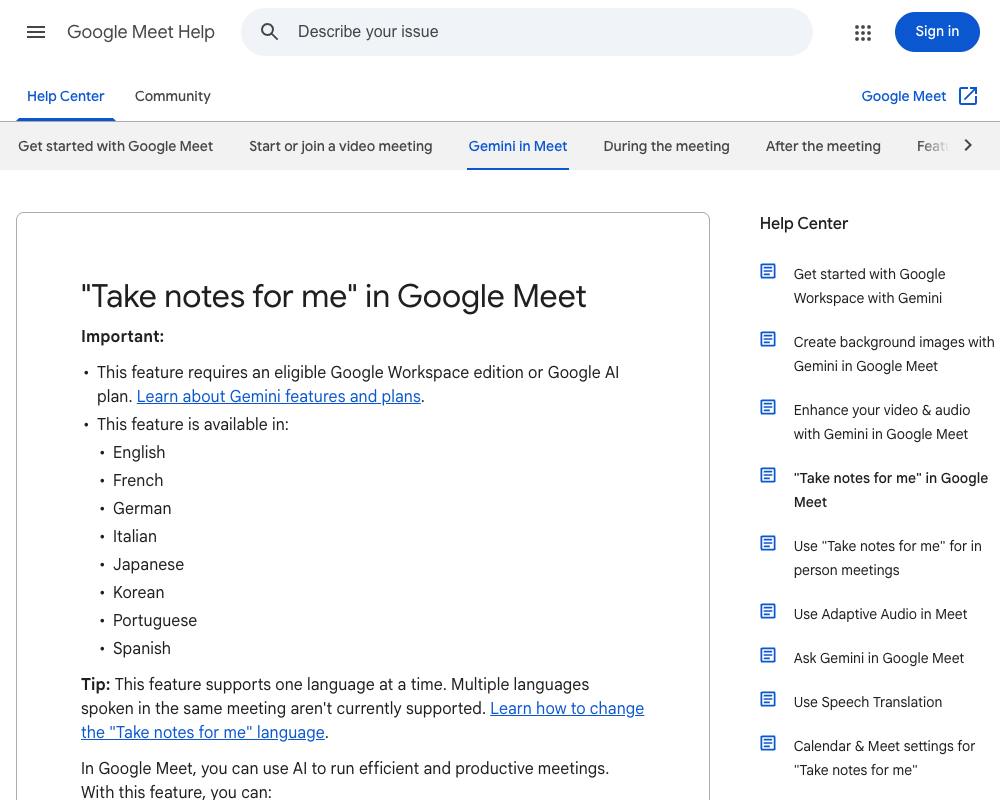
Google's English help calls it "Take notes for me." You'll also see "Gemini notes," "auto notes" or "Take notes with Gemini" (the Calendar label) in articles and settings. They all refer to the same feature.
- During a meeting: the "Take notes for me" icon in the top right, then "Start taking notes"
- Ahead of time: open the event in Google Calendar, click "Video call options," then "Meeting records," and check "Take notes with Gemini"
What you get afterward
These are Gemini's notes, organized into a summary, decisions, next steps and details. They aren't a verbatim transcript. If you need to check exactly what was said, you'll need recording or transcription, which are separate features.
Is it free? Eligible plans
Workspace (company accounts)
Google's "Gemini features and plans" page lists these editions for "Take notes for me" in Google Meet:
- Business Standard / Business Plus
- Enterprise Standard / Enterprise Plus
- Frontline Plus
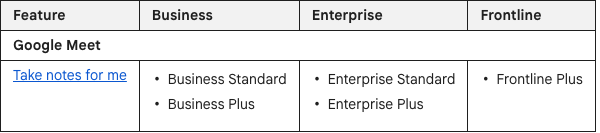 Google Docs Editors Help: Gemini features and plans (Google Meet row only)
Personal accounts: Google AI Pro or Ultra (since June 2026)
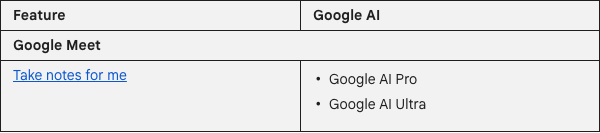 Google Docs Editors Help: Gemini features and plans (Google Meet row only)
Google AI Plus, the tier below Pro, is not listed for this feature.
| Plan | Take notes for me in Meet |
|---|---|
| Free Google account | Not available |
| Google AI Plus (personal) | Not listed |
| Google AI Pro / Ultra (personal) | Available in meetings you host |
| Workspace Business Starter | Not available |
| Workspace Business Standard and up | Available |
Prices differ by country and change with promotions, so check Google's official pricing pages for your region before you subscribe.
What you can do without a plan
So on a free account, your option is to ask the organizer to share. We'll come back to this below.
Language conditions
| Condition | What Google says |
|---|---|
| One language per meeting | Meetings that mix multiple languages aren't currently supported |
| Language detection | If another language is spoken for at least 30 seconds, you're prompted to change it |
| Meeting length | Designed for meetings from 15 minutes to 8 hours |
| Short meetings | Under 15 minutes or with poor connectivity, notes can be incomplete or missing |
If your meetings switch between English and another language, only one will be covered. A quick 10 minute check-in may produce empty notes.
Whether non-hosts can use it depends on the organizer
This is why the button was missing on the client's link.
Who can start and stop notes
Guests from another company can't start it
That holds even if your own company is on Business Plus or you personally pay for Google AI Ultra.
Who receives the notes
Who gets the notes after the meeting depends on the organizer's "Send notes to" setting:
- All invited guests, including people outside the organization
- Invited guests in the organization
- Hosts and co-hosts only
For instant meetings that weren't scheduled, notes go only to the organizer and the person who started them.
Troubleshooting table
| Symptom | Likely cause | Who to check with |
|---|---|---|
| No notes icon in the top right | Organizer's plan isn't eligible (free Gmail, Starter, etc.) | The organizer |
| No notes icon in the top right | You're a guest outside the organizer's organization | Ask the organizer to start it |
| No icon even in internal meetings | Your admin turned the feature off, or smart features are off | Your IT admin |
| Icon is there but you can't use it | Host management is on and you're not a host or co-host | The organizer |
| You attended but got no notes | Sharing is set to internal only or hosts only, or you weren't on the invite | The organizer |
| Notes are empty or very short | Meeting under 15 minutes, connection issues, language mismatch | Meeting length and language setting |
Four ways to keep notes when you're not the host
When you can't rely on "Take notes for me" in someone else's meeting, here are your options.
| Method | Works without the host's help? | What you end up with | Best for |
|---|---|---|---|
| Ask the organizer | No | Gemini's notes | Close relationships, occasional requests |
| Caption-capture extension | Yes | Transcript text | Joining from a browser, text is enough |
| Upload a recording to Gemini | Yes (you still need a way to record) | Notes you generate yourself | A few meetings a month |
| Record on your Mac and generate notes | Yes | Recording plus AI notes | Many client calls, need slides on screen too |
Ask the organizer
The simplest route: "Could you share the notes after the call?" The organizer has to start notes and set sharing to include guests outside the organization. Also check that you're on the Calendar invite.
Asking this of every client isn't realistic, so save it for the meetings that matter most.
Use a caption-capture extension
You only get caption text. No audio, and nothing from shared screens.
Upload a recording to Gemini
The downside is that exporting, uploading, prompting and sharing are manual every time. That's fine a few times a month, but it doesn't scale.
Record on your Mac and generate notes
Record the meeting's screen and audio on your own device. This happens outside Meet's permission system, so it doesn't matter who organized the call or what plan they're on.
- Screen and audio recording is free with no time limit, and no watermark
- Records both your voice and the other side's audio (system audio) without setting up virtual audio drivers like BlackHole
- No bot joins the meeting, so nothing extra appears in the participant list
- With Pro ($9/month at launch pricing), AI generates notes from the recording and sends them straight to Notion
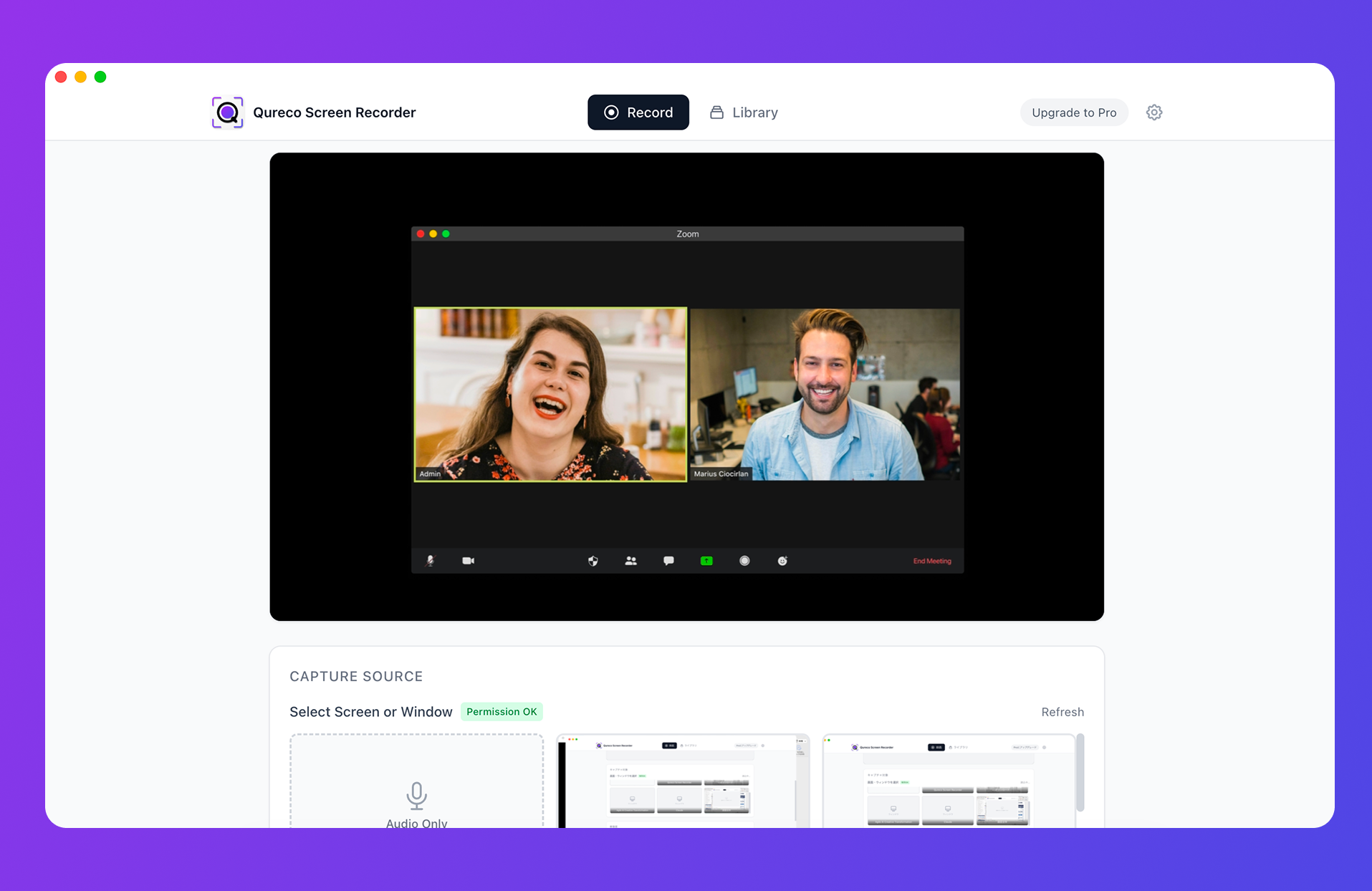
Pro comes with a 2-week free trial, no credit card required.
A few caveats. Qureco is macOS only and doesn't run on Windows. It also doesn't show live captions or summaries during the meeting. If you want to follow text on screen while people are talking, Meet's live captions or a caption extension is a better fit.
Tell people you're recording
Which option fits
| Your situation | Best choice |
|---|---|
| Company on Business Standard or above, mostly internal meetings you organize | Meet's "Take notes for me." No extra tools needed |
| Company on Business Starter | Consider upgrading for meetings you organize; record locally for others' meetings |
| Individual who hosts most of your own meetings | Google AI Pro with "Take notes for me" |
| You often join meetings organized by other companies | A plan won't fix this. Record on your device |
| Only a few important meetings need notes | Ask the organizer, or upload a recording to Gemini |
| Keep recordings and collect notes in Notion | Record locally with AI notes (Qureco Pro) |
FAQ
Can I use it on free Gmail if I'm the organizer?
No. On personal accounts, it's available to Google AI Pro and Google AI Ultra subscribers, and only in meetings they host.
If my company is on an eligible plan, can I use it in other companies' meetings?
No. What matters is the organizer's edition and whether you're inside the organizer's organization. Your own company's plan has no effect on meetings another company hosts.
Will other participants know notes are on?
Yes. Google's help says all participants are notified and a pencil icon appears on screen. Admins can also require participants to consent (off by default).
Is it the same as recording or transcription?
No. "Take notes for me" produces a summarized document, not a verbatim record. The Workspace pricing page also lists recording to Drive as unavailable on Starter.
Does it work in the mobile app?
For personal Google AI Pro and Ultra subscribers, Google's announcement says it works on web and mobile.
Can I use it for in-person meetings?
Can I use Meet's notes and Qureco together?
Glossary
| Term | Meaning |
|---|---|
| Take notes for me | Google Meet's feature where Gemini writes meeting notes automatically |
| Organizer | The person who created the meeting. Notes are saved to their Drive |
| Internal participant | Someone in the organizer's Workspace organization. External guests can't start notes |
| Host management | A setting that limits starting and stopping notes to hosts and co-hosts |
| Invited guests | People on the Calendar invite. This is the unit used for sharing notes |
| Google AI Pro | Google's paid personal plan. Since June 2026 it includes notes in Meet meetings you host |
Summary
- Google Meet's "Take notes for me" isn't available on free Gmail or Business Starter. It requires Business Standard or another eligible Workspace edition, or a personal Google AI Pro or Ultra plan
- It supports eight languages, one per meeting, and is designed for meetings of 15 minutes to 8 hours. Google publishes no accuracy figures
- The organizer decides whether it works. Only participants in the organizer's organization can start it, so guests from another company can't, regardless of their own plan
- Guests can still receive notes if the organizer shares with invited guests outside the organization
- If you often join other companies' meetings, recording on your own device and generating notes is the reliable route
When the button is missing, the cause is usually on the organizer's side, not your plan. Before your next call, check who's hosting it. That tells you whether Meet's notes will cover it or whether you need another way.

Qureco Screen Recorder
Powerful screen recording app for Mac
Record meetings, let AI handle the notes, just read what arrives in Notion.
Try all features free for the first two weeks.