How far does the free plan actually go? Where do the recordings live, and who can look at them? And if it doesn't work out, how do you stop paying?
Without answers to those three, you can't install a recording app on a work Mac, especially one you'll point at customer calls. You need something you can show your own team.
Pricing and the free plan
What can I do on the free plan?
| On the free plan | Details |
|---|---|
| Screen and audio recording | Unlimited length, no watermark |
| System audio | No virtual audio driver setup needed |
| Storage | Local on your Mac (folder is configurable) |
| Export | MP4 (video) / MP3 (audio only) |
| Requirement | A free account |
How much does Pro cost?
There are two tiers, FREE and PRO. PRO is priced as follows.
| Launch price | Regular price | |
|---|---|---|
| Monthly | $9 | $12 |
| Yearly | $81 | $108 |
Prices display in your local currency by region: yen in Japan, US dollars elsewhere.
What does Pro add?
30GB of cloud storage, automatic AI meeting notes, the Notion integration, and automatic cloud backup. Everything in FREE is included.
Is the first two weeks really free without a credit card?
Yes. Pro's first two weeks are free, and you don't register a card to try it. Since there's no card on file, nothing gets charged automatically when the trial ends.
If I go back to the free plan, what happens to my data?
Recordings saved locally stay on your Mac. They're files outside the app, so changing plans doesn't touch them.
Where data is stored, and security
This is the part people ask about most. Below are the privacy policy's provisions, rearranged as questions.
Where are recordings stored?
On the free plan, recordings are stored locally on your Mac, in a folder you can change in settings.
The privacy policy states it directly:
Recording data for which local storage is selected is stored only on your device and is not transmitted to our servers
In other words, choosing not to use the cloud features is itself the choice to keep recordings off our servers.
Who can access my data?
When I use AI meeting notes, where does the audio go?
| Provider | Purpose | Location |
|---|---|---|
| Amazon Cognito | Authentication and account management | Japan (Tokyo region) |
| Amazon S3 | Recording storage, app update delivery | Japan (Tokyo region) |
| Groq / Deep Infra | Speech-to-text transcription | United States |
| Google Gemini | Meeting note generation, automatic tagging | United States |
| Stripe | Billing and payment processing | United States |
| Notion | Meeting note export (only if you connect it) | United States |
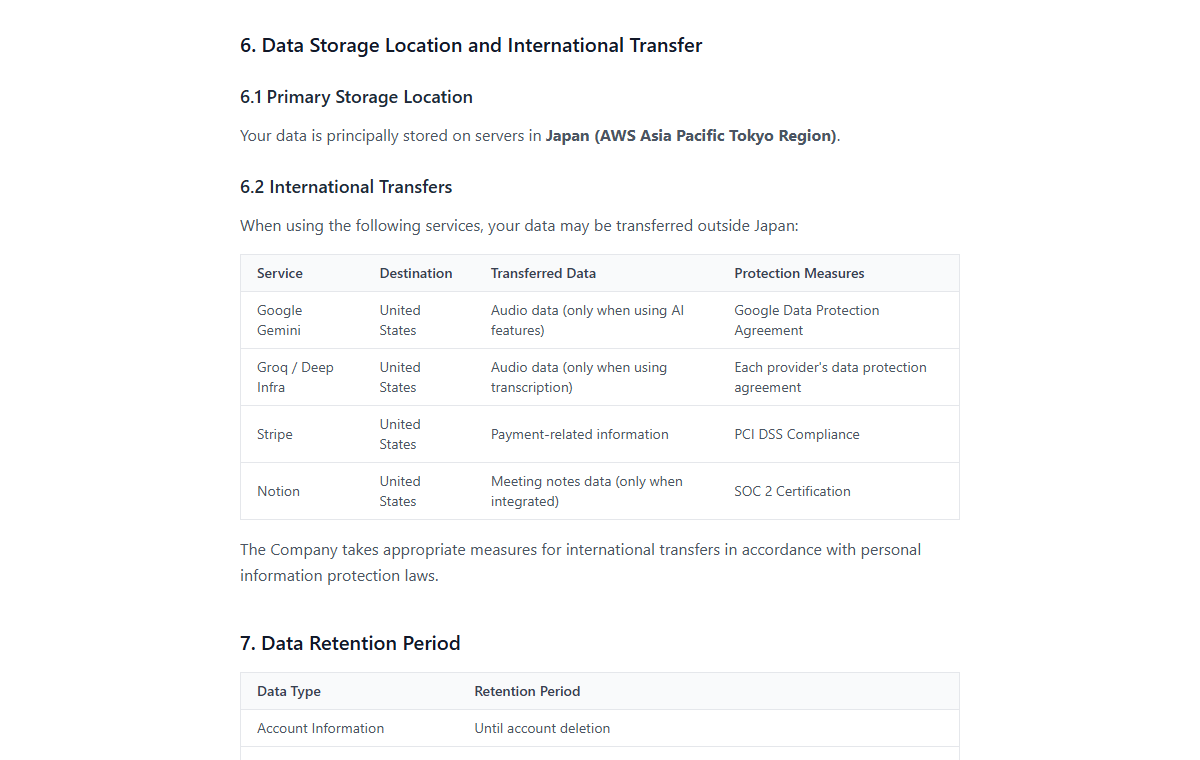
For long recordings, transcribed text may be sent in place of the audio.
Is my data used to train AI models?
No. The privacy policy states:
We do not use your recording data or meeting notes to train AI models
For recording and note-taking tools generally, this is a point worth checking in each provider's policy, and some don't address it. For Qureco, the statement above is the answer.
Is data encrypted?
All traffic is encrypted with TLS/SSL, and data stored in the cloud is encrypted with AES-256. Passwords are hashed, and authentication is token-based.
That said, the privacy policy itself notes that complete security cannot be guaranteed for any internet transmission or storage. Repeating that here rather than overstating the case. Managing your own password well still matters.
Can anyone see a shared meeting note?
Sharing only happens when you explicitly create a share link. A share page is then published as a web page anyone with the link can open.
- You can set an optional password when sharing
- You can disable the link at any time from within the app
- Share page data is deleted when you stop sharing or delete your account
A note you never share never becomes a page.
Is it OK to record work meetings?
Technically, yes, that's what the app does. Beyond the technical side, the terms of service prohibit "recording that infringes the rights of third parties (copyright, privacy rights, etc.)." If other people are in the meeting, telling them you're recording is the baseline.
Billing, cancellation, and your account
Where do I cancel?
Deleting the app does not cancel the subscription. Same as any other subscription service, and an easy mistake to make. Cancel first, then remove the app.
What's the difference between cancelling and deleting my account?
Worth separating clearly.
| Cancelling the subscription | Deleting the account | |
|---|---|---|
| Subscription | Stops | Cancelled automatically |
| Cloud recordings | Kept (cloud features stop working) | All deleted |
| Local recordings | Stay on your Mac | Stay on your Mac |
| Using the app | Continues on the free plan | No longer possible |
Account deletion runs from the app's Cloud Storage settings screen, via "Delete account." Deleting removes every recording stored in the cloud, and any active subscription is cancelled automatically.
If you just want the charges to stop, cancel. If you want the data gone, delete the account.
When is deleted data actually removed?
Following the retention periods in the privacy policy:
| Data type | Retention |
|---|---|
| Cloud recordings | Deleted within 30 days of account deletion |
| AI-generated meeting notes | Deleted within 30 days of account deletion |
| Transcribed text | Deleted within 30 days of account deletion |
| Share page data | On stopping sharing, or within 30 days of account deletion |
| Local recordings | Until you delete the files (they live on your Mac) |
| Usage data | Anonymized at account deletion and kept as statistics |
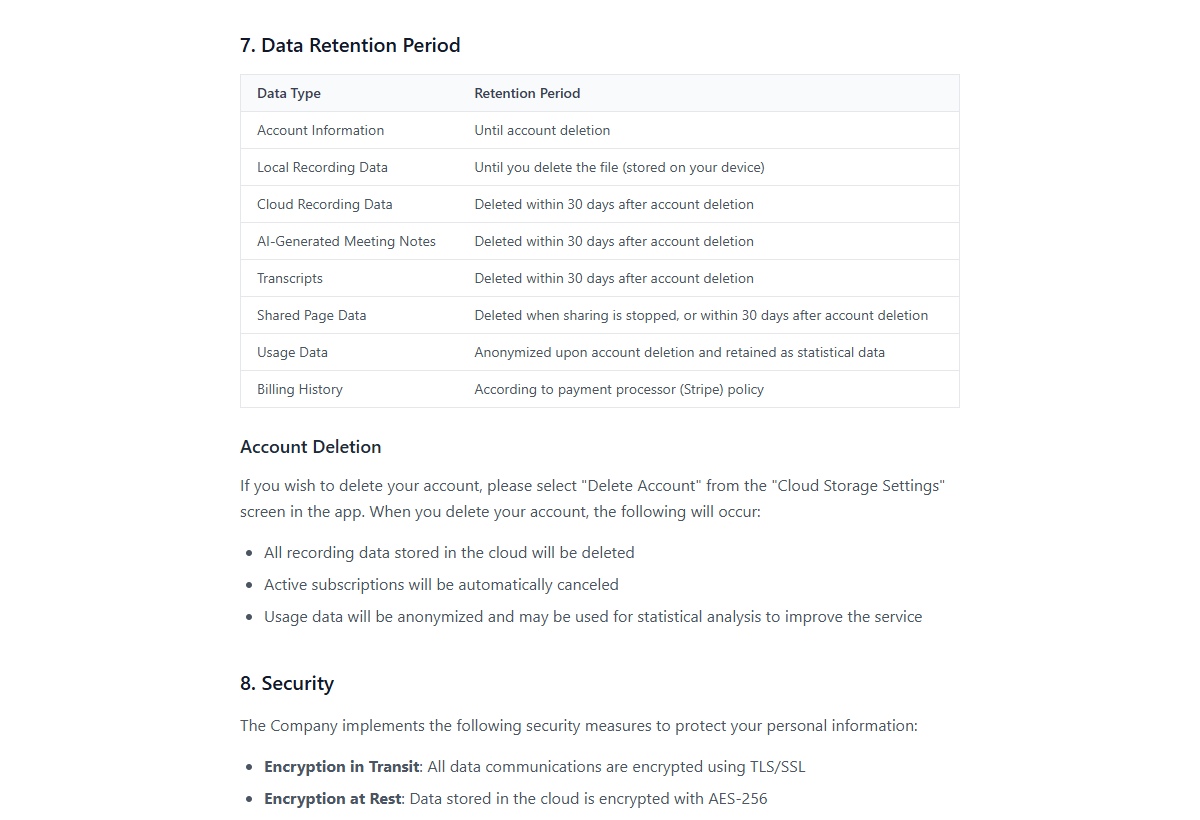
You can also review and delete individual cloud recordings from inside the app without deleting your account.
Do you offer refunds?
How is payment handled, and what about card details?
System requirements
| Item | Support |
|---|---|
| macOS | 12.0 Monterey or later |
| Chip | Apple Silicon and Intel |
| Windows | Not available (under consideration) |
| Meeting platforms | No restrictions (it records the screen and audio) |
| Video editing | Not included |
Which macOS versions are supported?
Is there a Windows version?
Not at the moment. macOS only, with Windows under consideration.
Does it only work with certain meeting platforms?
Can I edit video in it?
No. There's no trimming or captioning. Recording and export are the scope, and editing belongs in another app.
Is there a minimum age?
Qureco is not intended for children under 13, as stated in the privacy policy.
Still have a question?
Anything not covered here, reach the support desk.
- Support: support@qureco.jp
- Provider: Qurio Inc. (Kitaaoyama 1-3-3, Mitsuhashi Building 3F, Minato-ku, Tokyo)
- The original documents: Terms of Service / Privacy Policy
Depending on what you're after:
- The full picture and how to use it: What Is Qureco? Mac Screen Recording, AI Meeting Notes, and Notion
- Recording a meeting through to a transcript: How to Auto-Transcribe Meetings on a Mac
- Comparing tools side by side: Meeting Transcription Tools Compared for 2026
Wrapping up
- Two tiers: FREE, and PRO at the $9/month launch price. Yearly is about two months cheaper, and the launch price stays as long as you stay subscribed
- The free plan has no time limit and no watermark, but a free account is required
- Cloud storage is principally in Japan (AWS Tokyo region). Choose local storage and nothing is sent to our servers
- AI meeting notes send audio to Groq / Deep Infra and Google Gemini in the United States. AI features are optional, and your data is not used to train AI models
- Cancel any time from the app. Cancelling keeps the free plan; deleting the account removes cloud data within 30 days
- Requirements: macOS 12.0 or later, Apple Silicon or Intel. No Windows build, no video editing
Everything you need in order to decide is published. The quickest way to check the rest is to record one meeting on the free plan, and if writing up the notes is still the part that costs you time, try Pro's free two-week trial.

Qureco Screen Recorder
Powerful screen recording app for Mac
Record meetings, let AI handle the notes, just read what arrives in Notion.
Try all features free for the first two weeks.