You recorded a 90-minute client call. You open the file, and it cuts off at the 30-minute mark. The second half, including the action items and the next meeting date, simply isn't there.
One note before we start: this article covers Mac only. Roundups titled "10 free recorders with no time limit" routinely mix in Windows-only tools, which quietly halves the real list for anyone on a Mac.
The Short Answer: Four Free Options With No Time Cap on Mac
As of August 2026, these are the free options on Mac that record with no length limit.
| App | Time limit | The other person's voice (system audio) |
|---|---|---|
| Qureco | None | Captured |
| macOS built-in recorder (Shift+Command+5) | None | Not captured |
| QuickTime Player | None | Not captured |
| OBS Studio | None | Captured (macOS 13 or later) |

Qureco Screen Recorder
Powerful screen recording app for Mac
Record meetings, let AI handle the notes, just read what arrives in Notion.
Try all features free for the first two weeks.

Time Limits by App (Mac-Compatible Only)
Here is the full picture. Every number below comes from the provider's own pricing or plans page.
| App | Free recording length | Video count cap | Watermark | System audio |
|---|---|---|---|---|
| Loom | 5 min per video (meeting recordings unlimited) | 25 videos | Yes | Yes |
| ScreenPal | 15 min | Unlimited (10 hosted) | Yes | Paid plans only |
| Clipchamp | 30 min total | — | No | Tab recording only |
| Screencastify | 30 min | 10 videos | Yes | Yes |
| macOS built-in | Unlimited | Unlimited | No | No |
| QuickTime Player | Unlimited | Unlimited | No | No |
| OBS Studio | Unlimited | Unlimited | No | Yes (macOS 13+) |
| Qureco | Unlimited | Unlimited | No | Yes |
Stops at 5 minutes: Loom's free plan
Loom's free plan is widely described as capping videos at five minutes. There is an important distinction buried in that description, though.
Stops at 15 minutes: ScreenPal (formerly Screencast-O-Matic)
Stops at 30 minutes: Clipchamp and Screencastify
No time limit: macOS built-in, QuickTime, OBS, and Qureco
The screen recorder built into macOS (Shift+Command+5) and QuickTime Player have no length cap. They keep recording as long as you have disk space.
The Clock Is Only One of Five Limits
Looking at the table above, you may have noticed that free tiers don't restrict you on time alone. In practice, four other limits come with it.
| Limit | Examples | When you notice it |
|---|---|---|
| Video count | Screencastify 10, Loom 25 | After a few weeks of use |
| Watermark | ScreenPal, Screencastify | After you export |
| Export and sharing | Quality caps, hosted-video caps | When you try to share |
| System audio | Excluded from ScreenPal free | When you play it back and the other voice is missing |
Count limits bite weeks later
A time limit shows up on day one. A count limit shows up once you've already built the habit. If you record a twice-weekly standup, a 10-video allowance fills up in about a month. If the plan is to record every meeting, the count matters more than the minutes.
Watermarks show up after the export
System audio is the real Mac trap
Three Reasons a Recording Stops Even With No Time Limit
If you picked an unlimited app and the recording still ended early, the cause sits outside the recorder.
1. The meeting itself ends
| Platform | Free plan cap |
|---|---|
| Zoom | 40 minutes for 3+ participants / unlimited for 1:1 |
| Google Meet | 60 minutes for 3+ participants / up to 24 hours for 1:1 |
Schedule a 90-minute discussion on a free Zoom account and everyone gets disconnected at 40 minutes. A recording that ends at 40 minutes isn't a recorder limitation; it's the meeting ending. If a long session is coming up, check this before you check your recording app.
2. You run out of disk space
"Unlimited" is still bounded by storage. Recording at 1080p eats several GB per hour. If a long session is coming, dropping to 720p cuts that substantially, and text on screen is still perfectly readable at 720p for meeting-notes purposes.
3. Sleep or a crash halts the capture
Choosing by Use Case: Recording a 90-Minute Call for Free
Putting it together:
| Use case | Recommendation | Why |
|---|---|---|
| Long recordings of your own screen | macOS built-in / QuickTime | Unlimited, nothing to install |
| Streaming or heavy configuration | OBS Studio | Free, unlimited, highly configurable |
| Long calls including the other voice | Qureco | Unlimited, no watermark, system audio supported |
| Short explainers shared by link | Loom | Strong sharing links and view analytics |
- No cap on length or on the number of recordings: 90 minutes or three hours, it keeps going
- No watermark: files exported on the free plan come out clean
- System audio supported: the other person's voice and your own are captured together, with no virtual audio setup
- Selectable resolution: 1080p, 720p, 480p, or 360p, which is the practical lever for keeping long sessions manageable on disk
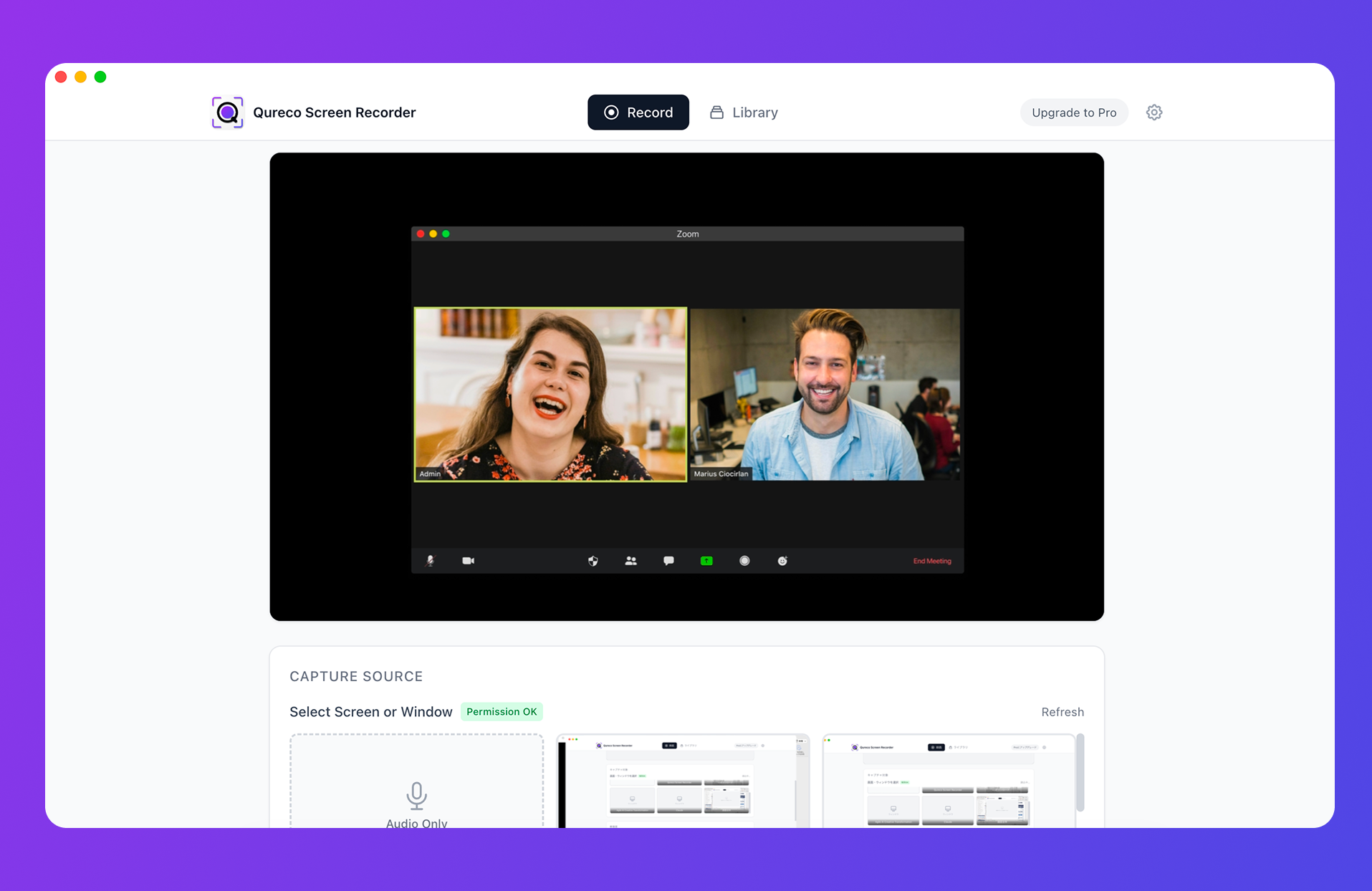
A few caveats worth noting: Qureco is macOS only, and it has no video editor, no shareable links for the video itself, and no view analytics. Meeting notes can be shared by link, but the video cannot. If you need to trim a recording and distribute it, pair it with another tool.
If what you want is the meeting turned into something readable, the Pro plan ($9/month, first two weeks free, no credit card required) generates AI meeting notes from the recording and pushes them to Notion in one click, so the 90 minutes you captured turn into notes you can actually read.
Wrap-Up: Don't Choose on the Minute Count Alone
The essentials:
- On Mac, the free and genuinely unlimited options are the macOS built-in recorder, QuickTime Player, OBS Studio, and Qureco
- Free tiers restrict more than time. Video count, watermarks, export, and system audio all come with it
- ScreenPal free is 15 minutes and excludes system audio. Screencastify free is 30 minutes and caps you at 10 videos. Read past the headline number
- Loom's 5-minute cap applies to video recordings. Meeting recordings are unlimited even on free
- If an "unlimited" app still cut out, suspect the meeting platform first: Zoom free ends at 40 minutes, Google Meet free at 60
If your next call runs 90 minutes, the question isn't "how many minutes can this record?" It's "can this keep all 90, with the other person's voice and without a watermark?" Choose on that and the problem stops repeating.
Qureco Screen Recorder
Powerful screen recording app for Mac
Record meetings, let AI handle the notes, just read what arrives in Notion.
Try all features free for the first two weeks.